Introduction
AssemblyAI's Voice Agent API has two ways to give an agent a tool, and almost everything written about it uses the same one.
The documented path is function tools. You open a WebSocket, declare the tools on the session, then sit waiting for tool.call events, run the matching function, and send tool.result back. It works, and it's the same shape whether you're in Python, Node, Twilio or Agora.
The other path is HTTP tools, and it barely shows up anywhere. Instead of declaring tools on a session, you describe the whole agent once as a JSON document, put a URL on each tool, and POST it to AssemblyAI. It stores that agent and gives you back an agent_id. After that, when the agent needs to know what Tuesday looks like, AssemblyAI calls your URL itself.
That's not a style preference. It decides where your agent actually runs. A function-tool agent only exists while something of yours holds the socket open to answer each tool.call, so it stops working the moment you close the laptop. A stored agent with HTTP tools is a JSON document sitting on AssemblyAI's servers calling a REST API, which is a shape you already know how to deploy.
This tutorial builds a dental receptionist on that second path. It answers, checks real availability against a live calendar, books a slot, and reads back a confirmation code, with no dispatcher and no WebSocket anywhere in the backend.
What you'll build:
- An
agent.jsonholding the whole agent (prompt, voice, keyterms, four HTTP tools), uploaded once and run by AssemblyAI - A FastAPI booking service whose responses are written to be spoken, not parsed
- A
get_todaytool that fixes the single most common bug in voice schedulers - Tool schemas that make the agent re-ask instead of guess, plus the phone-number bug that shows exactly where that stops working
- A browser demo page that shows AssemblyAI hitting the API live, so you can watch the mechanism while a call is happening
Three things came up while building this that the docs don't cover. Schema rejection is completely opaque to the agent, which quietly turns a correct validation rule into a lost booking. An empty slot list means two different things, and conflating them makes the agent say something untrue. And logging tool calls from FastAPI middleware needs one specific header dropped or the response comes back malformed. Each one is covered in the step where it bit.
AssemblyAI runs its own Voice Agent Hackathon on lablab.ai, and agents that take an action rather than just transcribe are a common shape across AI hackathons more broadly. If you want an event to build one in, browse lablab.ai's global AI hackathons.
The reference implementation is on GitHub at vicdevman/assemblyai-voice-agent-scheduler. Every code block below links to its exact source.
See it running first
Clone the finished project and hear it work before writing any code:
git clone https://github.com/vicdevman/assemblyai-voice-agent-scheduler.git
cd assemblyai-voice-agent-scheduler
python -m venv .venv
.venv/Scripts/activate          # macOS/Linux: source .venv/bin/activate
pip install -r requirements.txt
cp .env.example .env
Put your AssemblyAI key in .env, then start the API, expose it, and publish the agent:
uvicorn app.main:app --reload                    # terminal 1
cloudflared tunnel --url http://localhost:8000   # terminal 2, copy the https URL into .env
python scripts/create_agent.py                   # terminal 3
Open http://localhost:8000, press Start call, and ask for a cleaning next Tuesday.
Here's a real call, unedited. The arrows are AssemblyAI hitting the booking API on its own, with nothing of the developer's in the loop:
AGENT   Thanks for calling Brightsmile Dental. Are you looking to book
        an appointment?
CALLER  Yeah, I need a cleaning. Tuesday if you've got it.

     -> get_today()                  { today: "2026-09-05", weekday: "Saturday" }
     -> check_availability(service="cleaning", date="2026-09-08")
                                     { ok: false, reason: "day_full",
                                       suggested_date: "2026-09-09" }

AGENT   Tuesday the 8th is fully booked, but I can do Wednesday the 9th
        at 9:00 am or 11:30 am. Would either work?
CALLER  Wednesday morning's fine, the early one.

AGENT   Great, can I get your full name?
CALLER  Ada Lovelace.
AGENT   And a mobile number for the confirmation?
CALLER  zero nine one, six three eight three, six nine five zero
AGENT   Which country are you calling from?
CALLER  Nigeria.
AGENT   Let me read that back: plus two three four, nine one six,
        three eight three, six nine five zero. Is that right?
CALLER  Yep.

     -> book_appointment(service="cleaning", date="2026-09-09", time="09:00",
                         customer_name="Ada Lovelace", phone="+2349163836950")
                                     { ok: true, confirmation_code: "KGLDA4" }
     -> send_confirmation(confirmation_code="KGLDA4")

AGENT   You're booked for Wednesday at 9. Your code is K-G-L-D-A-4,
        and I've texted it over.
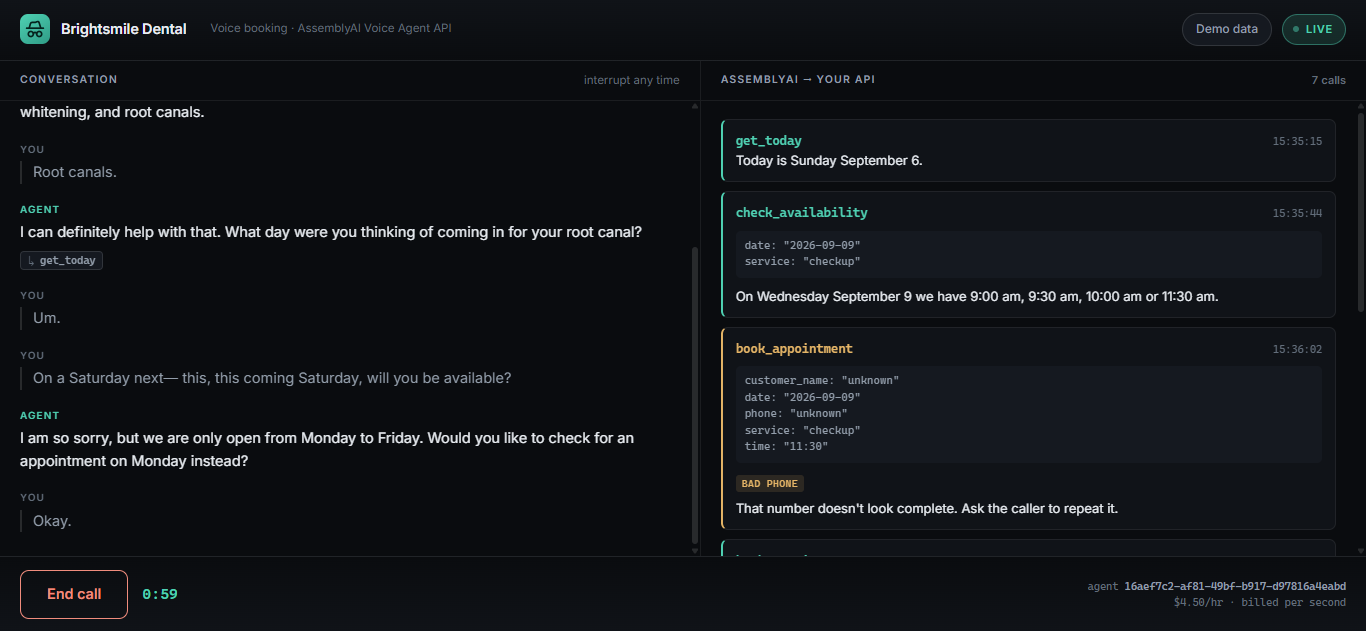
Two moments there matter more than the booking. When Tuesday came back full, the agent offered Wednesday instead of apologising, because the API's failure response carried the alternative. And when the caller read a Nigerian number with no country code, the agent asked which country rather than falling over. Both are design decisions, and both are covered below.
Prerequisites
- Python 3.11+
- An AssemblyAI account. Sign up and grab your API key. New accounts get $50 in non-expiring credit, and the Voice Agent API costs $4.50/hour billed per second, so building this will cost you cents.
- A tunnel. Either ngrok or cloudflared. Step 6 explains why.
- A browser with a microphone. Chrome or Edge are the smoothest.
You don't need WebSocket experience, async Python, or any audio programming. That's the point of this path.
The whole configuration is three values:
# .env.example
# Get yours at https://www.assemblyai.com/dashboard
ASSEMBLYAI_API_KEY=

# Filled in after scripts/create_agent.py runs
AGENT_ID=

# Public HTTPS base URL of the booking API below.
# AssemblyAI calls this directly, so localhost will NOT work.
# Dev:  cloudflared tunnel --url http://localhost:8000
# Prod: your Render / Railway / Fly URL
PUBLIC_API_BASE_URL=
Notice what isn't in there: no WebSocket URL, no model name, no voice setting, no tool definitions. All of that lives on AssemblyAI's side after Step 7, which is the whole point of the architecture.
Dependencies are similarly thin. There's no AssemblyAI SDK here, because the only things your server ever does are POST a JSON document and mint a token:
fastapi==0.115.6
uvicorn[standard]==0.34.0
pydantic==2.10.4
python-dotenv==1.0.1
httpx==0.28.1
Step 1: The agent is a JSON file, not a program
Start with the thing that trips people up. In this architecture your agent isn't code. It's a document you upload once, and AssemblyAI stores it and runs it.
Here's the skeleton of agent.json:
{
  "name": "Brightsmile Dental Scheduler",
  "greeting": "Thanks for calling Brightsmile Dental. Are you looking to book an appointment?",
  "voice": { "voice_id": "alba" },
  "system_prompt": "You are the scheduling assistant for Brightsmile Dental...",
  "keyterms": ["Brightsmile", "cleaning", "whitening", "root canal", "hygienist"],
  "tools": [ ... ]
}
Four kinds of thing live in there, and they're worth naming separately:
- Who it is:
name,voice,greeting,system_prompt. Its personality and its rules. - What it should expect to hear:
keyterms. These bias the transcriber toward your vocabulary, so "whitening" doesn't come back as "widening". - What it's allowed to do:
tools, each with a name, a description, an argument schema, and a URL.
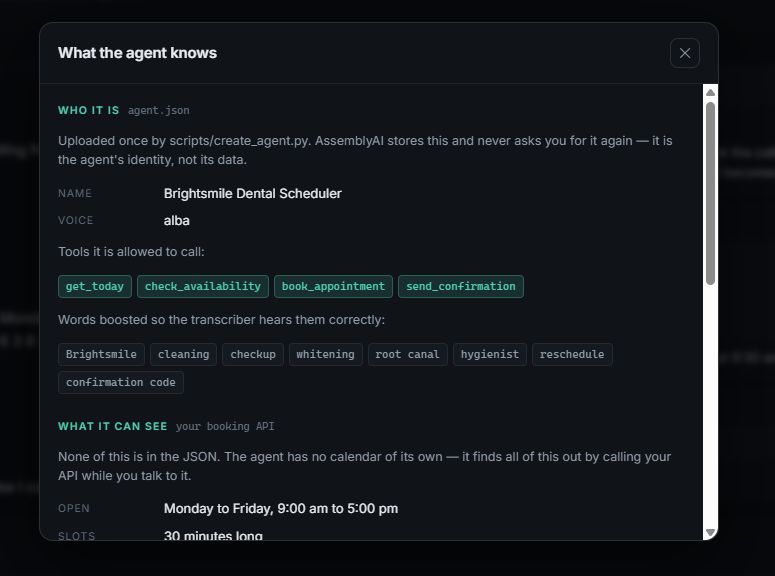
And one thing that's emphatically not in there: the calendar. Not a single appointment, not one open slot. The agent has no idea what Tuesday looks like until it calls your API during the conversation.
That split is the whole mental model:
agent.json  --POST once-->  AssemblyAI stores it, returns an agent_id
                                      |
during a call the client sends only { agent_id }
                                      |
when the agent needs a fact, AssemblyAI POSTs to the tool's URL
                                      |
                            your booking API answers live
Configuration is uploaded once. Data is fetched on every call. You can rebook the entire calendar without touching agent.json, and change the agent's voice without touching the calendar.
The demo page built in Step 8 has a Demo data panel that puts both halves of that split side by side, which is the fastest way to see what the agent is and isn't carrying around:
The system_prompt is worth reading properly, because in this architecture it's doing the work a dispatcher's control flow would normally do. It's one JSON string in the file. Unescaped, it reads:
You are the scheduling assistant for Brightsmile Dental. Keep every reply
under two sentences and speak naturally, like a receptionist on the phone.

You have no sense of today's date. Call get_today before reasoning about any
day the caller mentions ('tomorrow', 'next Tuesday') and convert it to a
YYYY-MM-DD date yourself. The clinic is open Monday to Friday only.

Booking sequence:
1. Find out which service they want. Offered: cleaning, checkup, whitening,
   root-canal. Nothing else.
2. Call check_availability and read back the open times.
3. Once they pick a time, collect their full name, then their phone number.
   Ask for them one at a time.
4. Call book_appointment only when you have all five: service, date, time,
   full name, and a phone number that includes a country code. Never call it
   with a field still missing or guessed.
5. Call send_confirmation with the confirmation code, then read the code
   aloud one character at a time.

Phone numbers: you need the international form starting with a plus and the
country code. If the caller gives a national number (it starts with a zero,
or they just say the local digits), ask which country they are calling from
and convert it yourself before booking. A Nigerian 0916 383 6950 is
+2349163836950; a UK 07700 900123 is +447700900123. Read the full
international number back and get a yes before you book.

Every tool returns a 'message' field. Base what you say on that field. If a
tool returns ok=false, tell the caller what the message says and act on it:
'needs_country_code' means ask which country they are in, 'closed' or
'day_full' means offer the day the message suggests. Never say the booking
system is broken. Never invent an opening, a confirmation code, or a price.
Three things in there are doing real work, and each one exists because the agent got it wrong without them. The numbered sequence stops it calling book_appointment with a guessed name. "Under two sentences" stops it monologuing, which on a phone call just sounds broken. And that last paragraph, base what you say on the message field, is what makes Step 2 work at all. An API that answers in sentences is useless unless the prompt tells the agent to trust those sentences over its own improvisation.
Step 2: A booking API that answers in sentences
Before wiring anything to AssemblyAI, build the service it'll call. It's an ordinary FastAPI app. The interesting decision isn't the routing, it's the shape of the responses.
A REST API written for another program raises exceptions and returns status codes. An API written for a voice agent should return values the model can read out loud. Every endpoint here returns an ok flag and a message field:
# app/main.py
@app.post("/tools/check_availability")
def check_availability(req: AvailabilityRequest) -> dict:
    if req.service not in store.SERVICES:
        return {
            "ok": False,
            "reason": "unknown_service",
            "message": f"We don't offer '{req.service}'. We offer: "
                       f"{', '.join(sorted(store.SERVICES))}.",
        }

    day = _parse_day(req.date)
    if day is None:
        return {"ok": False, "reason": "bad_date",
                "message": "Date must be in YYYY-MM-DD form."}
There's no raise HTTPException anywhere in that path. A 4xx response tells the agent "something went wrong" and nothing else, and what it says to the caller afterwards is a coin flip. A 200 carrying ok: false and a sentence tells it exactly what to say next.
The most important case is a failure that carries a way forward. When the requested day is full:
# app/main.py
    alternatives = store.next_open_days(day)
    alt = alternatives[0]
    return {
        "ok": False,
        "reason": "day_full",
        "suggested_date": alt.isoformat(),
        "suggested_slots": store.available_slots(alt),
        "message": (
            f"{_speak_day(day)} is fully booked. "
            f"The next opening is {_speak_day(alt)} at "
            f"{_speak_slots(store.available_slots(alt))}."
        ),
    }
That's why the agent in the transcript offered Wednesday. It didn't reason its way there; the API handed it the alternative inside the failure. Failures are values, not exceptions. A voice agent that treats every non-success as a dead end will hang up on people.
The same applies to a double booking. book_appointment returns slot_taken along with the times still free that day, so the agent recovers inside the same breath instead of starting over.
One small thing worth copying: format times for speech, not for machines.
# app/main.py
def _speak_time(value: str) -> str:
    """'14:30' -> '2:30 pm'. Built by hand: %-I is glibc-only and breaks on Windows."""
    parsed = datetime.strptime(value, "%H:%M")
    hour = parsed.hour % 12 or 12
    suffix = "am" if parsed.hour < 12 else "pm"
    return f"{hour}:{parsed.minute:02d} {suffix}"
Hand the model "14:30" and you're relying on it to convert. Hand it "2:30 pm" and there's nothing to get wrong.
The calendar behind all this is deliberately boring: a dict of services, a set of taken slots, and a seeded scatter of existing bookings so availability looks realistic on a first run.
# app/store.py
SERVICES = {
    "cleaning": {"label": "Dental Cleaning", "minutes": 30},
    "checkup": {"label": "Routine Checkup", "minutes": 30},
    "whitening": {"label": "Teeth Whitening", "minutes": 60},
    "root-canal": {"label": "Root Canal", "minutes": 90},
}

OPEN_HOUR, CLOSE_HOUR, SLOT_MINUTES, HORIZON_DAYS = 9, 17, 30, 14


def _seed_existing_bookings() -> None:
    """Pre-book a deterministic scatter of slots so availability looks real."""
    rng = random.Random(20260901)
    for day_offset in range(HORIZON_DAYS):
        day = date.today() + timedelta(days=day_offset)
        if day.weekday() >= 5:
            continue
        for slot in _slots_for_day(day):
            if rng.random() < 0.45:
                _taken.add((day.isoformat(), slot))
The seed is fixed on purpose. A random calendar means the "Tuesday is full" moment in your demo works once and then never again. A fixed seed means every clone of this repo hits the same busy days, so the tutorial and the demo agree.
available_slots also caps at four by default. That isn't a performance choice. It's because "we have nine thirty, ten, ten thirty, eleven, eleven thirty, twelve…" read aloud is unusable, and truncating the list in the API is cheaper than prompting the model not to recite it.
Step 3: The agent has no clock
This is the bug that'll eat your afternoon if nobody warns you.
Ask the agent for "next Tuesday" and it'll confidently produce a date. It'll often be wrong, because the model has no reliable sense of today. It isn't looking at a calendar, it's predicting what a date probably looks like.
The fix is a tool whose only job is to answer that question:
# app/main.py
@app.post("/tools/get_today")
def get_today() -> dict:
    """The model has no clock. Without this it guesses dates, and guesses wrong."""
    today = date.today()
    upcoming = store.next_open_days(today - timedelta(days=1), count=3)
    return {
        "ok": True,
        "today": today.isoformat(),
        "weekday": today.strftime("%A"),
        "next_open_days": [
            {"date": d.isoformat(), "weekday": d.strftime("%A")} for d in upcoming
        ],
        "message": f"Today is {_speak_day(today)}.",
    }
Then make the system prompt insist on it:
You have no sense of today's date. Call
get_todaybefore reasoning about any day the caller mentions ('tomorrow', 'next Tuesday') and convert it to a YYYY-MM-DD date yourself. The clinic is open Monday to Friday only.
One extra round trip at the start of the conversation, and every date after it is anchored to something real. Returning next_open_days in the same response is what keeps it to one round trip: the agent gets "today is Saturday" and "the next three days we're open" together, so a caller asking for "the soonest you have" doesn't trigger a second lookup.
While you're here, handle the weekend honestly. An early version of this project returned "fully booked" for a Saturday, because available_slots came back empty and the code didn't distinguish empty-because-busy from empty-because-shut. The agent then told a caller the clinic was fully booked on a day it was simply closed, which is a small lie that sounds exactly like a real one. The endpoint now checks store.is_open(day) before it looks at slots, and returns reason: "closed" with the next open day attached.
Step 4: Letting AssemblyAI make the call
Now the part that separates this from every other tutorial. AssemblyAI supports two kinds of tool:
- Function tools, declared inline in
session.tools. The agent emitstool.call, your code runs the logic and sends backtool.result. This is what every other tutorial uses. - HTTP tools, declared on a stored agent with a
url. AssemblyAI makes the request for you.
An HTTP tool looks like this:
{
  "name": "check_availability",
  "description": "List open appointment times for a service on a specific date. The clinic is closed at weekends.",
  "parameters": {
    "type": "object",
    "properties": {
      "service": {
        "type": "string",
        "description": "The service the caller wants.",
        "enum": ["cleaning", "checkup", "whitening", "root-canal"]
      },
      "date": {
        "type": "string",
        "description": "The day to check, as YYYY-MM-DD.",
        "pattern": "^[0-9]{4}-[0-9]{2}-[0-9]{2}$",
        "examples": ["2026-09-08", "2026-09-15"]
      }
    },
    "required": ["service", "date"]
  },
  "http": { "url": "{{BASE_URL}}/tools/check_availability", "http_method": "POST" },
  "timeout_seconds": 10
}
The http block is the entire difference. With it there's no tool.call for you to handle, no dispatcher to write, and no long-lived process to keep alive. Your API secrets stay on your server, because your server is the only thing that ever touches them.
{{BASE_URL}} isn't an AssemblyAI feature. It's a placeholder this project substitutes at publish time, so the same agent.json works against a tunnel today and a Render URL tomorrow without a hand-edit. Step 7 shows the four lines that do it.
Two details in that block are easy to skim past. timeout_seconds is per tool, and it's a real budget, because the caller is sitting in silence while it runs. And description is read by the model, not by you, which is why "The clinic is closed at weekends" is in there: so the agent doesn't waste a turn checking Saturday.
One constraint from the docs worth respecting is to keep tool sets small, under about ten per phase. Past that, the model's accuracy at picking the right one drops. This project uses four, which is comfortable.
Step 5: Schemas that make the agent re-ask instead of guess
Look again at that schema. enum, pattern, examples aren't documentation, they're enforcement. A value that fails them gets rejected before your API is ever called, and the agent asks the caller again.
That's enormously useful, and it's also where I broke this project badly enough that the failure is worth reproducing in full.
The phone field originally used strict E.164:
"phone": { "type": "string", "pattern": "^\\+[1-9]\\d{1,14}$" }
Correct, on paper. Then a real caller read a real Nigerian number out loud, 091 6383 6950, and this happened:
CALLER  Okay, um, 091-6383-6950.
AGENT   I'm so sorry, I'm having some trouble with our booking system.
        Would you mind giving me that phone number one more time?
CALLER  Okay, um, 091-6383-6950.
AGENT   I'm so sorry, I'm having some trouble getting that to go through
        on my end. Would you like me to have someone call you back?
The booking was lost. And the guardrail was working perfectly, because a national number genuinely doesn't match E.164. The problem is that schema rejection is opaque. The agent learns that the call failed. It doesn't learn that a country code was missing, so it can't ask for one. It reaches for the only explanation it has: the system is broken.
The fix is to move that particular check one layer out. Loosen the pattern to "looks like a phone number":
"phone": {
  "type": "string",
  "description": "Callback number in international form, starting with + and the country code. Convert national numbers before sending: Nigerian 0916 383 6950 becomes +2349163836950.",
  "pattern": "^[+0-9][-0-9 ()]{6,20}$",
  "examples": ["+2349163836950", "+14155552671", "+447700900123"]
}
Then normalise inside the API, where you can answer in words:
# app/main.py
def _normalize_phone(raw: str) -> tuple[str | None, str]:
    """Return (e164, problem). A national number is a question, not an error."""
    cleaned = "".join(ch for ch in raw if ch.isdigit() or ch == "+")
    lo, hi = E164_DIGITS

    if cleaned.startswith("+"):
        digits = cleaned[1:]
        if digits.isdigit() and lo <= len(digits) <= hi and not digits.startswith("0"):
            return "+" + digits, ""
        return None, "incomplete"

    digits = cleaned.lstrip("0")
    if digits.isdigit() and lo <= len(digits) <= hi:
        return None, "needs_country"
    return None, "incomplete"
The return type is what makes this work: (value, problem) rather than a raise or a bare None. It separates this number is unusable from this number is fine but under-specified, and only the second one is worth asking the caller about. Collapse them and you're back to the opaque failure that lost the booking.
Then return a sentence the agent can act on:
# app/main.py
    if problem == "needs_country":
        return {
            "ok": False,
            "reason": "needs_country_code",
            "message": (
                "I have the number but not the country code. Ask the caller which "
                "country they're calling from, then send it in full — a Nigerian "
                "0916 383 6950 becomes +2349163836950."
            ),
        }
Note who that message is addressed to. It isn't a line for the caller to hear, it's an instruction to the agent telling it what question to ask. Both audiences share one field, and writing for the wrong one is how you end up with an agent reciting "ask the caller which country" out loud.
Now the same call ends with a booking, because the agent knows what to ask.
The other branch pulls its weight too, and a real call shows why. The system prompt is explicit that book_appointment must never be called with a missing or guessed field. The agent called it anyway, with the string "unknown" in both customer_name and phone:
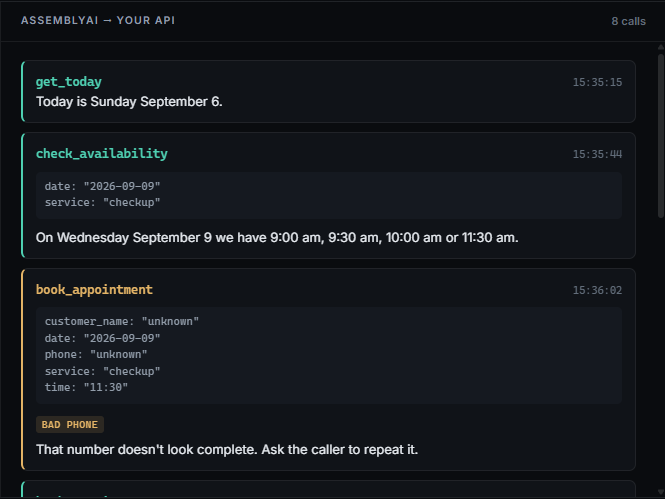
That's the argument for the whole layer, in one screenshot. A system prompt is guidance the model usually follows, not a constraint it can't violate, and "usually" covers a lot of ground on a live phone call. "unknown" sails through the schema, since the pattern was deliberately loosened and nothing about it looks invalid, and lands in your API, which is the only place left that can catch it. It returns bad_phone, the agent re-asks, and the call survives. If that check lived nowhere, the booking would have been written with a placeholder phone number and nobody would have found out until someone tried to call it.
The rule this leaves you with is short enough to remember: put a check in the schema when the agent can fix it by listening again, and in your API when the agent needs it explained. An enum of four services belongs in the schema, since a caller asking for a haircut just needs re-prompting. A phone number missing a country code belongs in your API, because recovering needs a question the agent couldn't otherwise know to ask.
Step 6: Why localhost will never work
Your tools now have URLs, and AssemblyAI calls them from its own servers. Which means http://localhost:8000 is unreachable. Not slow, not flaky, simply invisible.
You need a public HTTPS address. With the API running locally:
uvicorn app.main:app --reload
open a second terminal and pick one:
ngrok http 8000
# Forwarding  https://a1b2-102-89-33-14.ngrok-free.app -> http://localhost:8000
cloudflared tunnel --url http://localhost:8000
# https://formal-tribune-serving-mathematics.trycloudflare.com
Put the https address in .env with no trailing slash:
PUBLIC_API_BASE_URL=https://a1b2-102-89-33-14.ngrok-free.app
Then prove the outside world can reach it before going further:
curl -X POST https://a1b2-102-89-33-14.ngrok-free.app/tools/get_today
If that returns today's date, AssemblyAI can reach it too.
One trap that'll bite you later: both free tiers hand you a new URL every restart. When yours changes, update .env and re-publish the agent, or it'll keep calling a dead address and every tool will time out mid-conversation while the agent apologises to your caller.
Step 7: Publishing the agent and talking to it
Publishing is a single POST to /v1/agents. scripts/create_agent.py reads agent.json, substitutes your public URL into every tool, checks the URL actually answers, and uploads it. The substitution and the guard are the whole script:
# scripts/create_agent.py
def load_definition(base_url: str) -> dict:
    raw = (ROOT / "agent.json").read_text(encoding="utf-8")
    return json.loads(raw.replace("{{BASE_URL}}", base_url.rstrip("/")))


def check_reachable(base_url: str) -> None:
    parsed = urlparse(base_url)
    if parsed.scheme != "https":
        sys.exit(f"PUBLIC_API_BASE_URL must be https, got: {base_url}")
    if parsed.hostname in {"localhost", "127.0.0.1", "::1"}:
        sys.exit(
            "PUBLIC_API_BASE_URL points at localhost. AssemblyAI calls your tools "
            "from its own servers, so the URL has to be publicly reachable.\n"
            "Try: cloudflared tunnel --url http://localhost:8000"
        )
    resp = httpx.post(f"{base_url.rstrip('/')}/tools/get_today", timeout=10)
    resp.raise_for_status()
    print(f"  booking API reachable: {resp.json()['message']}")
That reachability check isn't defensive padding. Skip it and a bad URL gets accepted silently, and you find out thirty seconds into a call when the agent goes quiet and then apologises. Failing at publish time costs you a second. Failing at call time costs you the demo.
python scripts/create_agent.py
  booking API reachable: Today is Saturday September 5.

Created agent 16aef7c2-af81-49bf-b917-d97816a4eabd
  4 HTTP tools pointed at https://a1b2-102-89-33-14.ngrok-free.app
  saved to agent_id.txt
Edit agent.json and push the change with --update <agent_id>. The prompt, the voice, the tools and their URLs all live server-side now.
To talk to it from a browser, two things matter. First, the browser must never see your API key. Mint a short-lived token on your server instead:
# app/main.py
@app.get("/api/token")
def api_token() -> dict:
    """Mint a short-lived token. The browser must never see the API key."""
    api_key = os.getenv("ASSEMBLYAI_API_KEY")
    if not api_key:
        raise HTTPException(500, "ASSEMBLYAI_API_KEY is not set on the server")
    resp = httpx.get(
        "https://agents.assemblyai.com/v1/token",
        headers={"Authorization": f"Bearer {api_key}"},
        params={"expires_in_seconds": 300, "max_session_duration_seconds": 600},
        timeout=15,
    )
    if resp.status_code >= 400:
        raise HTTPException(resp.status_code, f"Token request failed: {resp.text}")
    return {"token": resp.json()["token"]}
Both numbers are deliberate. expires_in_seconds=300 is how long the token can be used to start a session. max_session_duration_seconds=600 caps how long that session may then run. A leaked token is worth at most one ten-minute call, which on a $4.50/hour meter is under a dollar of damage.
Second, connecting to a stored agent is a one-line session update. No prompt, no tools, no voice, because the server already has all of it:
// web/app.js
ws = new WebSocket(`wss://agents.assemblyai.com/v1/ws?token=${token}`);
ws.onopen = () => {
  ws.send(JSON.stringify({
    type: "session.update",
    session: { agent_id: config.agent_id },
  }));
};
Compare that to the inline-tools version of the same message, which has to carry the full prompt and every tool definition on every single connection. Here the client doesn't know what the agent can do, and doesn't need to.
Audio is PCM16 at 24 kHz, base64-encoded into input.audio frames, with reply.audio coming back the same way. Ask for the microphone with echoCancellation on so the agent doesn't interrupt itself:
// web/app.js
const SAMPLE_RATE = 24000;

stream = await navigator.mediaDevices.getUserMedia({
  audio: { echoCancellation: true, noiseSuppression: true, sampleRate: SAMPLE_RATE },
});
audioCtx = new AudioContext({ sampleRate: SAMPLE_RATE });
Setting sampleRate on the AudioContext as well as on the constraint is what stops the browser resampling behind your back. Audio that sort of works but transcribes badly is far more confusing to debug than audio that fails outright.
Barge-in, letting the caller cut the agent off mid-sentence, is one event and one function:
// web/app.js
case "input.speech.started":
  stopPlayback(); // the caller cut in
  break;
Finally, end the session properly. Closing the socket bare leaves a 30-second resume window that keeps billing:
// web/app.js
ws.send(JSON.stringify({ type: "session.end" }));
Step 8: Watching the calls land
There's a wrinkle here that's the flip side of the whole approach. Since HTTP tools execute on AssemblyAI's servers, your browser never sees them happen. There's no tool.call event to render. From the front end, the agent simply knows things.
That's fine in production and terrible for a demo, where the entire point is showing the mechanism. The fix is to log the calls where they actually arrive, in your API, with one piece of middleware:
# app/main.py
@app.middleware("http")
async def record_tool_calls(request, call_next):
    """Log every tool hit so the demo page can show AssemblyAI calling us."""
    if not request.url.path.startswith("/tools/"):
        return await call_next(request)
    body = await request.body()
    response = await call_next(request)
    payload = b"".join([chunk async for chunk in response.body_iterator])
    store.log_event(request.url.path, body, payload)
    return Response(
        content=payload,
        status_code=response.status_code,
        headers={k: v for k, v in response.headers.items() if k.lower() != "content-length"},
        media_type=response.media_type,
    )
Two gotchas are buried in those last lines. Draining response.body_iterator consumes the stream, so you have to build a fresh Response from the bytes you captured. Return the original and the client gets an empty body. And content-length has to be dropped from the copied headers, because Starlette recalculates it from the new content. Leave the stale one in and the response is malformed.
Expose that log at /api/events, poll it from the page while a call is live, and you get a panel that fills up in real time as AssemblyAI hits your endpoints. That's the right-hand pane in both screenshots above. Each agent reply carries small chips naming the tools behind it, and clicking one jumps to the exact request and response, which is how the "unknown" phone argument in Step 5 became visible at all.
Open http://localhost:8000, press Start call, and ask to book a cleaning for next Tuesday.
One honest caveat before you demo this to anyone: send_confirmation doesn't send an SMS. It marks the appointment as confirmed and returns a message saying it went out, which is enough to exercise the tool-calling path end to end. Wiring it to Twilio or Africa's Talking is a small change and a genuinely good first extension, but say "simulated" out loud when you present it.
Step 9: Deploying so the link outlives your terminal
A tunnel is fine while you build, but the URL dies with your terminal, and an agent nobody else can reach is hard to show to anyone. One thing decides how you deploy: the calendar and the tool-call feed live in memory, so this wants a long-running process, not a serverless function.
On Render, Railway or Fly it goes up as-is:
Build:  pip install -r requirements.txt
Start:  uvicorn app.main:app --host 0.0.0.0 --port $PORT
Set ASSEMBLYAI_API_KEY in the host's environment, then point the agent at the new address and re-publish:
PUBLIC_API_BASE_URL=https://your-app.onrender.com
python scripts/create_agent.py --update <agent_id>
Vercel supports FastAPI too, but its functions are ephemeral and can run on different instances per request. The browser polls /api/events several times a second, so it'd keep missing calls that landed on another instance. The agent would work correctly while the demo panel sat empty, which is a confusing failure to debug precisely because nothing is actually broken. Move store.py onto a real database first and it works fine.
Whatever you choose, you never need server-side WebSockets. The browser talks straight to AssemblyAI, and your API only ever answers plain HTTP. Deploy it once and anyone with the link can talk to the agent.
Frequently Asked Questions
Q: When should I use function tools instead of HTTP tools? When the tool needs something only the client has: reading the user's local filesystem, controlling the page they're looking at, or touching hardware. Anything that's really a server-side action (a database, a payment, an email, a booking) is a better fit for HTTP tools, because it removes the dispatcher entirely and keeps credentials off the client.
Q: Does this still work if my API is slow?
Each tool has timeout_seconds, and a tool that overruns leaves the agent waiting mid-conversation, which sounds like dead air. Keep tool handlers fast and boring. If something genuinely takes ten seconds, acknowledge it in the system prompt so the agent says "let me check that for you" before the silence.
Q: Why does my agent keep getting dates wrong?
Because it has no clock. See Step 3: add a get_today tool and instruct the system prompt to call it before interpreting any relative day. This is the single most common bug in voice schedulers.
Q: My tool calls all time out after working fine yesterday. What broke?
Almost certainly your tunnel URL changed. Free ngrok and Cloudflare tunnels issue a new address on every restart, and the agent is still pointed at the old one. Update PUBLIC_API_BASE_URL and re-run create_agent.py --update <agent_id>.
Q: How do I stop anyone on the internet from calling my tool endpoints?
They're public URLs, so treat them as such. This project is safe because there's nothing worth stealing behind them. For anything real, send a shared secret in a header on each tool's http block and reject requests that arrive without it, and never let a tool return data the caller in the conversation shouldn't hear.
Q: Can I use my own LLM instead of AssemblyAI's?
Yes. The Voice Agent API accepts any OpenAI-compatible endpoint via an llm block with base_url, model and api_key, and it must support streamed chat completions. Be deliberate about it though, because latency and reliability become yours, and this is a realtime voice loop where a slow first token is immediately audible.
Q: Can I put this on a real phone number? Not on a Twilio trial number, which only dials numbers you've verified in advance, so nobody else could ring your demo. On a paid number AssemblyAI connects over SIP, and none of the architecture above changes: the agent is still a stored JSON document calling your REST API.
Q: Where should I take this pattern next?
The four tools here are a teaching set, not a product. Swapping the in-memory store for a real database, wiring send_confirmation to an actual SMS provider, and adding reschedule and cancel tools that look an appointment up by confirmation code are each a step toward something real. The underlying shape, a stored agent plus a few HTTP tools plus a service that answers in sentences, transfers to restaurants, field dispatch and support triage without changing. It's also a practical thing to know going into an AI hackathon, where a voice agent that survives its own demo beats one that needs a laptop kept open. Browse lablab.ai's AI hackathons for an event to build in.
Conclusion
The interesting thing about this build isn't that it books appointments. It's how little of it is yours to run. There's no dispatcher, no persistent connection, no orchestration loop, just a JSON file describing an agent and a REST API that answers questions when asked.
What that buys you is a voice agent shaped like ordinary web infrastructure. You can deploy it anywhere that serves HTTP, test the tools with curl, and hand someone a link without keeping a terminal open.
The two lessons worth carrying to your own project are smaller than the architecture. Write API responses to be spoken, and make failures carry a way forward, because a full day that names the next open one keeps a conversation alive where a bare error ends it. And put your validation where the agent can act on it: schema checks for what it can fix by listening again, your own code for anything that needs explaining. That distinction is one lost booking away from being obvious, and now you get it for free.
This shape is one of the most reusable ideas across AI hackathon projects, because it swaps a fragile long-lived process for infrastructure you already know how to deploy. Browse lablab.ai's upcoming AI hackathons if you want to build on it with a team.
Clone the repo at vicdevman/assemblyai-voice-agent-scheduler, and go build something that answers the phone.