Introduction
Intel's own Anomalib reference kit already shows how to spot a defective part with OpenVINO: train a one-class model on "good" images, export it to OpenVINO's IR format, and run inference on CPU. What it doesn't cover is the other half of a real sorting line — the rule that decides where a defective part goes changes from shift to shift, and today that means a human editing a config file or hard-coding a threshold. Nobody has written up replacing that step with something an operator can just say out loud.
This tutorial builds that missing half. An operator speaks a sort rule — "send anomalous items to bin two, normal items to bin one" — Speechmatics transcribes it in real time, and a small deterministic parser turns it into a structured rule. Separately, an Anomalib Padim model, exported to OpenVINO and run through OpenVINO's runtime, scores an item image as normal or anomalous. The two fuse into one decision: which bin this specific item goes to, right now, under whatever rule was spoken most recently.
Voice-driven inspection and sorting is also a natural project shape for AI hackathons — it combines a real-time speech API with an edge-deployable vision model, two categories that show up constantly in lablab.ai's global AI hackathons. If your track involves robotics, manufacturing, or accessibility, this pipeline is a working starting point rather than a demo you'd have to build from a blank file.
What you'll build:
- A synthetic "normal vs. defective" image dataset (no download, no dataset license to worry about) and a Padim anomaly model trained on it with Anomalib, exported to OpenVINO IR
- A
speechmatics-rtclient that transcribes a spoken sort command in real time - A deterministic parser that turns that transcript into a structured bin rule
- A fusion step that combines a per-image anomaly score with the spoken rule into a bin decision
- A Gradio demo showing both halves of the pipeline live — record the rule, then classify items one at a time
This is the software brain only — no robot arm required. Swap the printed/UI bin decision for a call to whatever actuator you're sorting with (a Dobot arm, a PLC, a conveyor gate) and the rest of this pipeline stays the same.
The full working project is on GitHub at Stephen-Kimoi/voice-sort-agent. Every code block below links to its exact source on GitHub.
See it running first
Clone the finished project and run it before writing any code:
git clone https://github.com/Stephen-Kimoi/voice-sort-agent.git
cd voice-sort-agent
python3.11 -m venv venv
source venv/bin/activate
pip install -r requirements.txt
cp .env.example .env
Open .env and add your Speechmatics API key — see Prerequisites below for where to get it — then build the dataset and train the classifier once:
python dataset.py
python anomaly_classifier.py
Now run the CLI end to end:
python main.py
You'll see a spoken command get transcribed, parsed into a rule, and applied to every sample image:
Transcript: "Send anomalous items to bin two and normal items to bin one."
Parsed rule: anomalous -> bin 2, normal -> bin 1

image                              score  call       bin
good_000.png                       0.000  normal     1
anomalous_001.png                  1.000  anomalous  2
Or launch the Gradio demo (python ui.py) to record your own spoken rule and classify images one at a time, with the transcript, parsed rule, anomaly score, and bin decision all visible together:
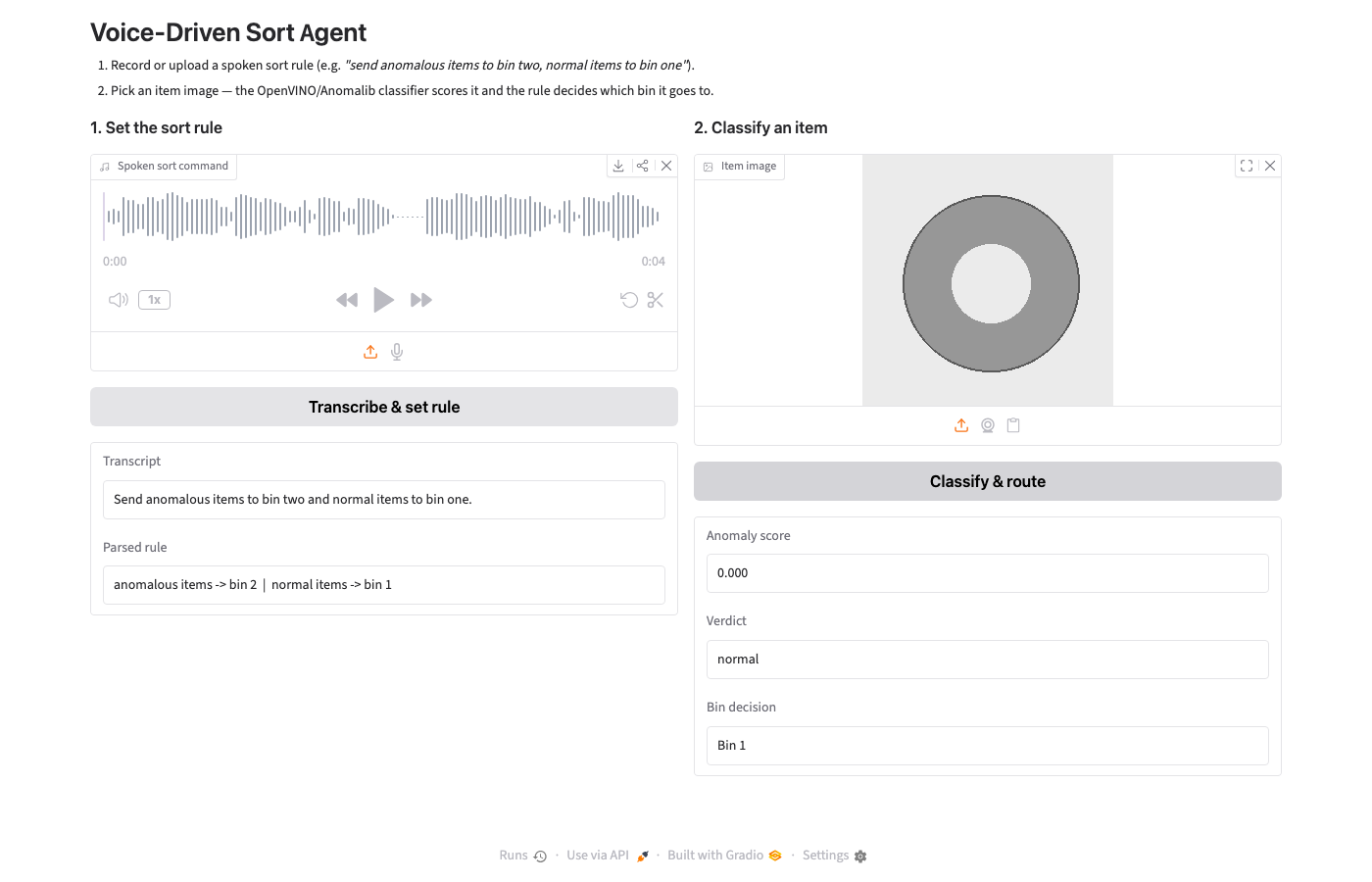
Say the rule once, and every item that comes through after that gets scored and routed under it, with no code touched in between. The rest of this tutorial builds that pipeline from scratch, piece by piece.
Prerequisites
- Python 3.11 (Anomalib's PyTorch/OpenVINO dependency chain is pinned tightly enough that 3.11 is the safest bet)
- A Speechmatics API key — the free tier gives 480 minutes/month with no card required
- macOS, if you want to regenerate the sample command audio with the included script (the
sayandafconvertcommand-line tools are macOS-only) — the repo already ships a ready-to-usesort_command.wav, so this is optional. On other platforms, supply your own 16kHz mono WAV recording of a spoken sort command.
Your .env should look like this:
# .env
SPEECHMATICS_API_KEY=your_speechmatics_key_here
Step 1: Generate a dataset with no license to worry about
Anomalib's documentation defaults to MVTec AD, the standard academic benchmark for anomaly detection. Two things make it a bad fit here: its own loader downloads the entire 5.2GB archive covering all 15 object categories just to reach the one folder you actually want, and the dataset itself is licensed for non-commercial research use only — not something you want baked into a public tutorial repo.
Instead, this project draws its own tiny dataset: a "washer" — a plain ring — that's either clean (normal) or has one of three synthetic defects (a radial crack, a chipped edge, a surface scratch). Padim, the anomaly model used in Step 2, only ever needs "good" examples to train, since anomaly detection is one-class — it learns what normal looks like, and anything that scores far enough outside that is flagged. The defective images exist purely to test the trained model, not to train it.
# dataset.py
"""Generates a small synthetic "washer" image set for the anomaly classifier.

We deliberately avoid MVTec AD here: anomalib's built-in loader for it downloads
the *entire* 5.2GB multi-category archive just to reach one category folder, and
the dataset itself is licensed for non-commercial research only. A synthetic set
gives full, original, license-free images in seconds and is good enough to prove
the pipeline — swap in your own product photos for a real deployment.

"Good" washers are a clean ring. "Anomalous" washers have one of: a radial crack,
a chipped edge, or a surface scratch. Padim only ever trains on "good" images
(anomaly detection is one-class); the anomalous ones exist purely to test it.
"""

import random
from pathlib import Path

from PIL import Image, ImageDraw

IMAGE_SIZE = 256
RING_OUTER = 90
RING_INNER = 40
CENTER = IMAGE_SIZE // 2


def _draw_good(seed: int) -> Image.Image:
    rng = random.Random(seed)
    img = Image.new("RGB", (IMAGE_SIZE, IMAGE_SIZE), (235, 235, 235))
    draw = ImageDraw.Draw(img)
    jitter = rng.randint(-3, 3)
    bbox_outer = [CENTER - RING_OUTER + jitter, CENTER - RING_OUTER + jitter,
                  CENTER + RING_OUTER + jitter, CENTER + RING_OUTER + jitter]
    bbox_inner = [CENTER - RING_INNER + jitter, CENTER - RING_INNER + jitter,
                  CENTER + RING_INNER + jitter, CENTER + RING_INNER + jitter]
    metal = (150 + rng.randint(-5, 5),) * 3
    draw.ellipse(bbox_outer, fill=metal, outline=(90, 90, 90), width=2)
    draw.ellipse(bbox_inner, fill=(235, 235, 235))
    return img


def _draw_anomalous(seed: int) -> Image.Image:
    rng = random.Random(seed)
    img = _draw_good(seed)
    draw = ImageDraw.Draw(img)
    defect = rng.choice(["crack", "chip", "scratch"])
    if defect == "crack":
        angle = rng.uniform(0, 360)
        import math
        x1 = CENTER + RING_INNER * math.cos(math.radians(angle))
        y1 = CENTER + RING_INNER * math.sin(math.radians(angle))
        x2 = CENTER + RING_OUTER * math.cos(math.radians(angle))
        y2 = CENTER + RING_OUTER * math.sin(math.radians(angle))
        draw.line([(x1, y1), (x2, y2)], fill=(40, 40, 40), width=4)
    elif defect == "chip":
        angle = rng.uniform(0, 360)
        import math
        cx = CENTER + (RING_OUTER - 10) * math.cos(math.radians(angle))
        cy = CENTER + (RING_OUTER - 10) * math.sin(math.radians(angle))
        draw.ellipse([cx - 12, cy - 12, cx + 12, cy + 12], fill=(235, 235, 235))
    else:
        x1, y1 = CENTER - 50, CENTER - 20
        x2, y2 = CENTER + 55, CENTER + 15
        draw.line([(x1, y1), (x2, y2)], fill=(60, 60, 60), width=3)
    return img


def build_dataset(root: Path, n_train_good: int = 40, n_test_good: int = 10, n_test_anomalous: int = 10) -> None:
    train_good = root / "train" / "good"
    test_good = root / "test" / "good"
    test_anomalous = root / "test" / "anomalous"
    for d in (train_good, test_good, test_anomalous):
        d.mkdir(parents=True, exist_ok=True)

    for i in range(n_train_good):
        _draw_good(seed=i).save(train_good / f"good_{i:03d}.png")
    for i in range(n_test_good):
        _draw_good(seed=1000 + i).save(test_good / f"good_{i:03d}.png")
    for i in range(n_test_anomalous):
        _draw_anomalous(seed=2000 + i).save(test_anomalous / f"anomalous_{i:03d}.png")

    print(f"Wrote {n_train_good} train/good, {n_test_good} test/good, "
          f"{n_test_anomalous} test/anomalous images under {root}")


if __name__ == "__main__":
    build_dataset(Path("data"))
Run it once:
python dataset.py
This writes 40 training images (all "good"), plus 10 clean and 10 defective test images under data/.
Step 2: Train a Padim model and export it to OpenVINO
Padim scores how far a new image's features fall from the statistical distribution it learned from "good" examples during training — no labeled defects needed at training time, which matches a real factory floor where you have plenty of good units and only a handful of known-bad ones. Training itself happens once, in PyTorch, through Anomalib's Engine. For inference, the trained model is exported to OpenVINO's IR format and served through OpenVINO's own runtime instead of PyTorch — this is the same deployment path Intel's reference kits use, and it's what makes the classifier CPU-only and edge-deployable rather than needing a GPU at inference time.
# anomaly_classifier.py
"""Trains a Padim anomaly model with Anomalib and serves inference through OpenVINO.

Padim is a one-class model: it only ever sees "good" images during training and
learns what normal looks like statistically (per-patch feature distributions
from a frozen, pretrained ResNet18). At inference time it scores how far a new
image's features fall from that learned distribution — no anomalous examples are
needed for training, which matches the real factory scenario of having plenty of
good units and few labeled defect examples.

Training happens once in PyTorch (Anomalib's Engine). For inference we export
the trained model to OpenVINO's IR format and run it through OpenVINO's runtime
instead of PyTorch — this is the deployment path Intel's own reference kits use,
and it's what makes this pipeline edge-deployable on CPU-only hardware.
"""

from pathlib import Path

import numpy as np
import openvino as ov
from PIL import Image

MODEL_DIR = Path("model")
IMAGE_SIZE = 256


def train_and_export(data_root: Path = Path("data"), export_dir: Path = MODEL_DIR) -> Path:
    """Trains Padim on data_root/train/good and exports it to OpenVINO IR.

    Returns the path to the exported model.xml.
    """
    from anomalib.data import Folder
    from anomalib.engine import Engine
    from anomalib.models import Padim

    datamodule = Folder(
        name="washers",
        root=data_root,
        normal_dir="train/good",
        abnormal_dir="test/anomalous",
        normal_test_dir="test/good",
    )
    model = Padim()
    engine = Engine(max_epochs=1, accelerator="cpu", devices=1, default_root_dir=str(export_dir / "run"))
    engine.fit(model=model, datamodule=datamodule)

    export_dir.mkdir(parents=True, exist_ok=True)
    exported_path = engine.export(
        model=model,
        export_type="openvino",
        export_root=export_dir,
    )
    return Path(exported_path)


class OpenVINOAnomalyClassifier:
    """Loads an exported Padim OpenVINO model and classifies single images."""

    def __init__(self, model_xml: Path, threshold: float | None = None):
        core = ov.Core()
        compiled = core.read_model(model_xml)
        self.model = core.compile_model(compiled, "CPU")
        self.output = self.model.output(0)
        # Padim's OpenVINO export bakes its own decision threshold into the model
        # metadata when one isn't supplied, but we default to the Anomalib
        # standard of 0.5 on the normalized anomaly map/score if none is found.
        self.threshold = threshold if threshold is not None else 0.5

    def _preprocess(self, image_path: Path) -> np.ndarray:
        img = Image.open(image_path).convert("RGB").resize((IMAGE_SIZE, IMAGE_SIZE))
        arr = np.asarray(img).astype(np.float32) / 255.0
        arr = arr.transpose(2, 0, 1)[np.newaxis, ...]  # NCHW
        return arr

    def classify(self, image_path: Path) -> dict:
        arr = self._preprocess(image_path)
        result = self.model([arr])[self.output]
        score = float(np.asarray(result).reshape(-1).max())
        is_anomalous = score >= self.threshold
        return {"image": str(image_path), "score": score, "is_anomalous": is_anomalous}


if __name__ == "__main__":
    exported = train_and_export()
    print(f"Exported OpenVINO model to {exported}")
View anomaly_classifier.py on GitHub
Run it:
python anomaly_classifier.py
Training on 40 small synthetic images for a single epoch takes seconds on CPU, and Engine.export(..., export_type="openvino") writes the compiled model to model/weights/openvino/model.xml — the exact path OpenVINOAnomalyClassifier loads.
One honest gotcha worth flagging up front: with only ~40 training images and a single epoch, Padim's decision boundary isn't perfectly sharp. In testing, 7 of 10 synthetic anomalies scored clearly above the 0.5 threshold, but a couple of subtler defects landed close enough to the boundary to get misclassified as normal. More training images, more epochs, or a tuned threshold all fix this — it's left as-is here because the point of this tutorial is the pipeline's behavior (voice rule in, fused decision out), not a perfectly tuned model. A real deployment should validate the threshold against its own defect distribution before trusting it on a live line.
Step 3: Transcribe a spoken sort rule with Speechmatics
The speechmatics-rt SDK's AsyncClient handles the whole real-time session — connect over WebSocket, stream audio, and close — behind a single transcribe() call. The one detail that isn't obvious from a first read of the docs: the SDK wants raw PCM, not a .wav file handed to it directly. If you pass a WAV file straight through, its 44-byte RIFF header gets streamed as if it were audio data, corrupting the first fraction of a second of transcription. Strip the header first by reading through Python's wave module and passing the raw frames instead.
# transcriber.py
"""Streams a WAV file to Speechmatics real-time and returns the final transcript."""

import io
import os
import wave

from speechmatics.rt import (
    AsyncClient,
    AudioFormat,
    AudioEncoding,
    TranscriptionConfig,
    ServerMessageType,
)


async def transcribe_command(wav_path: str, on_partial=None) -> str:
    """Streams wav_path to Speechmatics and returns the concatenated final transcript.

    on_partial, if given, is called with each transcript fragment as it arrives —
    used by the Gradio UI to show transcription happening live rather than as a
    single blocking call.
    """
    api_key = os.environ["SPEECHMATICS_API_KEY"]

    with wave.open(wav_path, "rb") as wf:
        sample_rate = wf.getframerate()
        raw_pcm = wf.readframes(wf.getnframes())

    client = AsyncClient(api_key=api_key)
    fragments: list[str] = []

    @client.on(ServerMessageType.ADD_TRANSCRIPT)
    def _on_final_transcript(message):
        text = message.get("metadata", {}).get("transcript", "").strip()
        if text:
            fragments.append(text)
            if on_partial:
                on_partial(text)

    audio_format = AudioFormat(encoding=AudioEncoding.PCM_S16LE, sample_rate=sample_rate)
    transcription_config = TranscriptionConfig(language="en", enable_partials=False)

    async with client:
        await client.transcribe(
            io.BytesIO(raw_pcm),
            transcription_config=transcription_config,
            audio_format=audio_format,
        )

    return " ".join(fragments).strip()
transcribe_command takes an optional on_partial callback specifically so the same function can be reused unchanged between the CLI script (which just wants the final string) and the Gradio UI (which wants to show transcription happening live).
If you want to regenerate the sample command audio rather than record your own, the repo ships a small macOS-only helper:
# generate_sample_audio.py
"""Builds sort_command.wav from a spoken sort rule using macOS `say` + `afconvert`.

Only needed to (re)generate the fixture; the tutorial itself just streams the
resulting WAV through Speechmatics. Not portable off macOS — if you're on
another OS, record or supply your own 16kHz mono WAV command instead.
"""

import subprocess
from pathlib import Path

COMMAND_TEXT = "Send anomalous items to bin two, and normal items to bin one."
OUTPUT_PATH = Path("sort_command.wav")
SAMPLE_RATE = 16000
VOICE = "Samantha"


def main() -> None:
    aiff_path = Path("_command.aiff")
    subprocess.run(["say", "-v", VOICE, "-o", str(aiff_path), COMMAND_TEXT], check=True)
    subprocess.run(
        [
            "afconvert",
            str(aiff_path),
            str(OUTPUT_PATH),
            "-d", "LEI16",
            "-c", "1",
            "-r", str(SAMPLE_RATE),
            "-f", "WAVE",
        ],
        check=True,
    )
    aiff_path.unlink()
    print(f"Wrote {OUTPUT_PATH}: \"{COMMAND_TEXT}\"")


if __name__ == "__main__":
    main()
View generate_sample_audio.py on GitHub
This is a one-time fixture generator, not something the pipeline depends on at runtime — Speechmatics only ever sees the resulting WAV file, whether it came from say or from someone's actual voice.
Step 4: Parse the transcript into a structured sort rule
A sorting-line operator's vocabulary for this command is small and fixed: "defective," "anomalous," "bad," "good," "normal," a bin number. That's a strong signal to reach for a deterministic keyword-and-number parser instead of routing a five-word transcript through a second model call — it's cheaper, it's instant, and its behavior is fully predictable, which matters more than flexibility when the thing being parsed is a safety-relevant sort rule on a live line. If the vocabulary ever needs to grow past what a fixed keyword list can express, that's the point where swapping in an LLM parser would pay for itself — not before.
# rule_parser.py
"""Turns a transcribed spoken sort rule into a structured bin assignment.

Deliberately deterministic (keyword + number matching), not an LLM call: the
vocabulary a sorting-line operator uses is small and fixed ("defective",
"anomalous", "bad", "good", "normal", bin numbers), so a regex-based parser is
both cheaper and more predictable than routing a five-word command through a
second model. Swap this for an LLM parser only if the vocabulary needs to grow
past what a fixed keyword list can cover.
"""

import re
from dataclasses import dataclass

_WORD_TO_NUM = {
    "one": 1, "two": 2, "three": 3, "four": 4, "five": 5,
    "six": 6, "seven": 7, "eight": 8, "nine": 9, "ten": 10,
}

_ANOMALOUS_KEYWORDS = ("defect", "anomal", "bad", "damaged", "reject", "crack", "chip", "scratch")
_NORMAL_KEYWORDS = ("normal", "good", "clean", "pass")


@dataclass
class SortRule:
    normal_bin: int
    anomalous_bin: int
    raw_transcript: str

    def bin_for(self, is_anomalous: bool) -> int:
        return self.anomalous_bin if is_anomalous else self.normal_bin


def _number_after_keyword(text: str, keywords: tuple[str, ...]) -> int | None:
    for keyword in keywords:
        match = re.search(rf"{keyword}\w*[^.]*?\bbin\s+(\w+)", text)
        if not match:
            continue
        token = match.group(1)
        if token.isdigit():
            return int(token)
        if token in _WORD_TO_NUM:
            return _WORD_TO_NUM[token]
    return None


def parse_rule(transcript: str, default_normal_bin: int = 1, default_anomalous_bin: int = 2) -> SortRule:
    text = transcript.lower()

    anomalous_bin = _number_after_keyword(text, _ANOMALOUS_KEYWORDS)
    normal_bin = _number_after_keyword(text, _NORMAL_KEYWORDS)

    if anomalous_bin is None:
        anomalous_bin = default_anomalous_bin
    if normal_bin is None:
        normal_bin = default_normal_bin

    return SortRule(normal_bin=normal_bin, anomalous_bin=anomalous_bin, raw_transcript=transcript)
_number_after_keyword searches for a category keyword followed, somewhere in the same clause, by "bin" and a number — spoken either as a digit or a word ("bin two" and "bin 2" both resolve to 2). If a category isn't mentioned at all, parse_rule falls back to the sensible defaults (normal → bin 1, anomalous → bin 2) rather than raising, since a partially specified command ("just send anomalies to bin two") is a realistic thing an operator might say.
Step 5: Wire it together headless first
Before adding any UI, confirm the whole pipeline works end to end from the terminal: transcribe the spoken command, parse it into a rule, then run every test image through the classifier and fuse each result with the rule to print a bin decision.
# main.py
"""End-to-end pipeline: spoken sort rule + item images -> per-item bin decisions.

Run order: transcribe the spoken command -> parse it into a SortRule -> load the
trained OpenVINO anomaly classifier -> classify every image under data/test/ ->
fuse each classification with the rule to print a bin decision. This mirrors
what a real sorting line would do once per shift (set the rule) and then per
item (classify + route) — the CLI just runs all the items in one pass.
"""

import asyncio
from pathlib import Path

from dotenv import load_dotenv

from anomaly_classifier import OpenVINOAnomalyClassifier
from rule_parser import parse_rule
from transcriber import transcribe_command

MODEL_XML = Path("model/weights/openvino/model.xml")
COMMAND_WAV = Path("sort_command.wav")
TEST_IMAGE_DIRS = (Path("data/test/good"), Path("data/test/anomalous"))


async def run() -> None:
    print(f"Transcribing {COMMAND_WAV} ...")
    transcript = await transcribe_command(str(COMMAND_WAV))
    print(f"Transcript: \"{transcript}\"")

    rule = parse_rule(transcript)
    print(f"Parsed rule: anomalous -> bin {rule.anomalous_bin}, normal -> bin {rule.normal_bin}\n")

    if not MODEL_XML.exists():
        raise SystemExit(
            f"No trained model at {MODEL_XML}. Run `python anomaly_classifier.py` first."
        )
    classifier = OpenVINOAnomalyClassifier(MODEL_XML)

    print(f"{'image':<32} {'score':>7}  {'call':<10} bin")
    for directory in TEST_IMAGE_DIRS:
        for image_path in sorted(directory.glob("*.png")):
            result = classifier.classify(image_path)
            bin_number = rule.bin_for(result["is_anomalous"])
            call = "anomalous" if result["is_anomalous"] else "normal"
            print(f"{image_path.name:<32} {result['score']:>7.3f}  {call:<10} {bin_number}")


if __name__ == "__main__":
    load_dotenv()
    asyncio.run(run())
Run it:
python main.py
A real run — real Speechmatics API call, real trained OpenVINO model — produces output like this:
Transcript: "Send anomalous items to bin two and normal items to bin one."
Parsed rule: anomalous -> bin 2, normal -> bin 1

image                              score  call       bin
good_000.png                       0.000  normal     1
anomalous_001.png                  1.000  anomalous  2
anomalous_008.png                  0.333  normal     1
That third line is the borderline case flagged in Step 2 — a subtle synthetic defect that scored under the 0.5 threshold and got called normal. It's included here deliberately rather than cherry-picked away: a tutorial that only ever shows clean results teaches the wrong lesson about how anomaly detection behaves with a small training set.
Step 6: Build the live demo
The CLI output confirms the logic works, but it hides a real distinction: setting the rule and classifying an item happen at different times on an actual line, since the rule gets set once per shift while items get classified continuously. The Gradio UI keeps those two steps visually separate, reusing transcribe_command, parse_rule, and OpenVINOAnomalyClassifier unchanged from the CLI version.
Speechmatics' realtime client is async; Gradio's button callbacks are synchronous functions. Because each step here — one short command, one image — finishes in well under a second, a plain asyncio.run() inside the callback is enough; a background-thread-plus-queue bridge (the pattern you'd want for a long-running stream) would be solving a problem this UI doesn't have.
# ui.py
"""Gradio demo: upload a spoken sort-rule recording, then classify item images live.

Speechmatics' realtime client is async; Gradio's callbacks are sync generators.
We bridge the two with asyncio.run() per call rather than a background thread +
queue, because each step here (one short command, one image) completes in under
a couple seconds — a thread/queue bridge only earns its complexity when a
callback needs to yield partial results while a long stream is still running.
"""

import asyncio
from pathlib import Path

import gradio as gr
from dotenv import load_dotenv

from anomaly_classifier import OpenVINOAnomalyClassifier
from rule_parser import SortRule, parse_rule
from transcriber import transcribe_command

load_dotenv()

MODEL_XML = Path("model/weights/openvino/model.xml")
_classifier: OpenVINOAnomalyClassifier | None = None


def _get_classifier() -> OpenVINOAnomalyClassifier:
    global _classifier
    if _classifier is None:
        if not MODEL_XML.exists():
            raise gr.Error(f"No trained model at {MODEL_XML}. Run `python anomaly_classifier.py` first.")
        _classifier = OpenVINOAnomalyClassifier(MODEL_XML)
    return _classifier


def set_rule(audio_path: str | None):
    if not audio_path:
        raise gr.Error("Record or upload a spoken sort command first.")
    transcript = asyncio.run(transcribe_command(audio_path))
    rule = parse_rule(transcript)
    rule_summary = f"anomalous items -> bin {rule.anomalous_bin}  |  normal items -> bin {rule.normal_bin}"
    return transcript, rule_summary, rule


def classify_image(image_path: str | None, rule: SortRule | None):
    if not image_path:
        raise gr.Error("Choose an item image to classify.")
    if rule is None:
        raise gr.Error("Set the sort rule from a spoken command first.")
    result = _get_classifier().classify(Path(image_path))
    bin_number = rule.bin_for(result["is_anomalous"])
    verdict = "ANOMALOUS" if result["is_anomalous"] else "normal"
    return (
        f"{result['score']:.3f}",
        verdict,
        f"Bin {bin_number}",
    )


with gr.Blocks(title="Voice-Driven Sort Agent") as demo:
    gr.Markdown(
        "# Voice-Driven Sort Agent\n"
        "1. Record or upload a spoken sort rule (e.g. *\"send anomalous items to bin two, "
        "normal items to bin one\"*).\n"
        "2. Pick an item image — the OpenVINO/Anomalib classifier scores it and the rule "
        "decides which bin it goes to."
    )

    rule_state = gr.State(None)

    with gr.Row():
        with gr.Column():
            gr.Markdown("### 1. Set the sort rule")
            audio_in = gr.Audio(sources=["microphone", "upload"], type="filepath", label="Spoken sort command")
            set_rule_btn = gr.Button("Transcribe & set rule")
            transcript_out = gr.Textbox(label="Transcript", interactive=False)
            rule_out = gr.Textbox(label="Parsed rule", interactive=False)

        with gr.Column():
            gr.Markdown("### 2. Classify an item")
            image_in = gr.Image(type="filepath", label="Item image")
            classify_btn = gr.Button("Classify & route")
            score_out = gr.Textbox(label="Anomaly score", interactive=False)
            verdict_out = gr.Textbox(label="Verdict", interactive=False)
            bin_out = gr.Textbox(label="Bin decision", interactive=False)

    set_rule_btn.click(
        fn=set_rule,
        inputs=[audio_in],
        outputs=[transcript_out, rule_out, rule_state],
    )
    classify_btn.click(
        fn=classify_image,
        inputs=[image_in, rule_state],
        outputs=[score_out, verdict_out, bin_out],
    )

if __name__ == "__main__":
    demo.launch()
Run it:
python ui.py
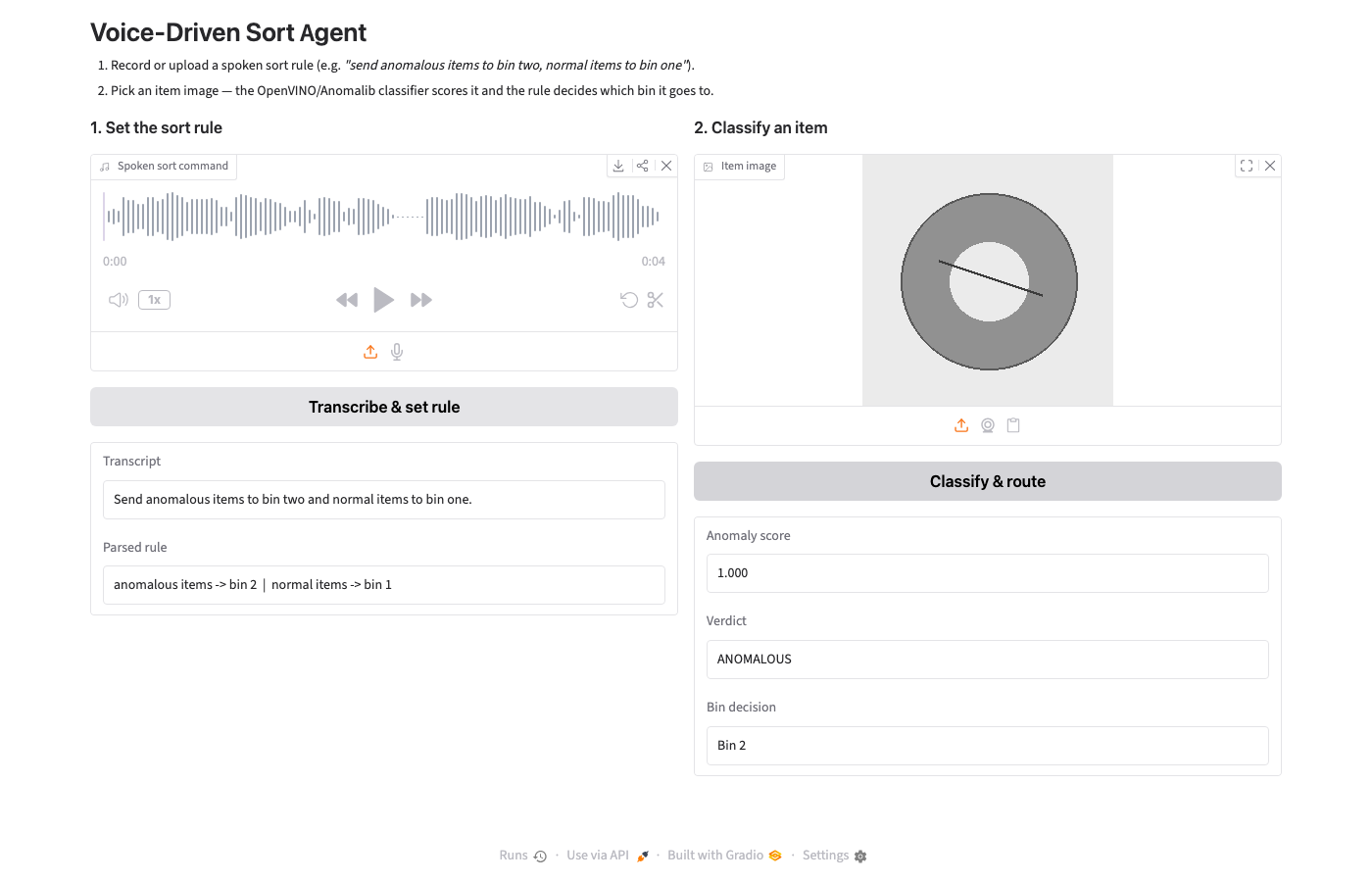
Open the local URL Gradio prints. Record or upload a spoken sort rule and click Transcribe & set rule — the transcript and parsed rule appear on the left. Then pick any image from data/test/good or data/test/anomalous and click Classify & route — the anomaly score, verdict, and final bin decision appear on the right, all driven by the rule you just spoke:
Frequently Asked Questions
Q: Does this need a physical sorting robot to run? No. Every piece here — transcription, rule parsing, classification, and the fused decision — runs on a laptop CPU with no actuator involved. The output is a bin number printed or shown in the UI; wiring that number to a Dobot arm, a PLC, or a conveyor gate is a separate, hardware-specific integration left out of scope on purpose.
Q: Why not just hard-code the sort rule? A hard-coded rule means someone edits code or a config file every time the sorting criteria change — which happens per batch or per shift on a real line. Speaking the rule instead means a non-technical operator can change it in one sentence with no deployment step.
Q: Why a deterministic parser instead of an LLM for the sort rule? The vocabulary an operator uses for this command is small and fixed — a handful of keywords and a bin number. A regex-based parser handles that entire space correctly, instantly, and for free, and its behavior is fully predictable — worth more than an LLM's flexibility when the thing being parsed controls where physical items get routed.
Q: What are some AI hackathon project ideas using this pattern? Voice-set rules over a vision classifier generalizes well beyond sorting: a voice-adjustable quality-control threshold on a production line, a spoken triage rule for a defect-review queue, or an accessibility tool where a technician calls out inspection criteria instead of typing them. All are realistic builds for an online AI hackathon track touching robotics, manufacturing, or edge AI.
Q: How long does this take to build for an AI hackathon? The dataset generation and model training in Steps 1–2 take a few minutes total on CPU. The Speechmatics and parsing pieces in Steps 3–4 are under 100 lines combined. A team could have the CLI pipeline in Step 5 working within a single hackathon session, with the Gradio demo in Step 6 as a stretch goal.
Conclusion
Neither half of this pipeline is novel on its own — Intel's reference kit already covers OpenVINO/Anomalib defect detection, and Speechmatics' real-time transcription is well documented. What's new is treating the sort rule itself as a runtime input instead of a deployment-time constant: the same trained classifier now serves any rule an operator can say in one sentence, without a code change or a redeploy.
Getting this to an actual line takes three changes: swap the synthetic washer dataset for real product photos (Padim only needs "good" examples to retrain), wire the printed/UI bin decision to a real actuator instead of a print statement, and extend the parser's vocabulary if a line needs more than two bins. None of those changes touch the fusion logic in the middle, which is really the point: the voice-to-rule client and the anomaly classifier don't need to know about each other to work together.