
🤝 Top Collaborators


🤓 Latest Submissions
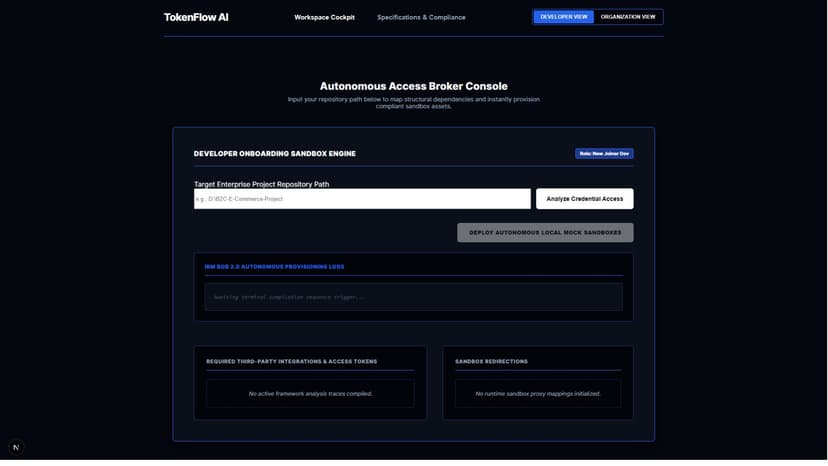
TokenFlow AI - Autonomous Onboarding Platform
The Problem - When new developers join an engineering team or pivot to an unfamiliar repository, they face immense friction managing credential configurations and mapping local sandbox environments securely. Manual setups lead to compliance leakage, broken local configurations, and lost engineering velocity. The Solution - TokenFlow AI bridges this operational gap as an Autonomous Access Broker Console. Built by team Horizondev, our platform features a secure Python scanner backend that processes structural dependencies and extracts configuration pathways into a clean database engine. This powers our Next.js driven Workspace Cockpit, allowing fresh joiners to instantly run credential compliance diagnostics. Why It’s Creative and Unique - TokenFlow AI eliminates human setup errors by introducing single click local sandbox initialization alongside a live visual security gate. By transforming raw configuration logs into real time visual mappings, it completely sanitizes the developer environment, cutting enterprise onboarding ramp up cycles by over 75% while keeping workspace workflows entirely compliant. How It Works & User Navigation Journey - 1. Target Selection & Path Configuration - A newly onboarded developer opens the TokenFlow AI dashboard browser view. Under the Developer View option, the user navigates down to the Target Enterprise Project Repository Path field input, pastes the absolute storage directory path of their project folder, and clicks the "Analyze Credential Access" action button. 2. Backend Execution & Real Time Logging - The click event instructs our Python FastAPI backend engine to launch an exhaustive, recursive search of the codebase directory. The engine isolates exposed settings and maps integration parameters. The system instantly returns these telemetry metrics directly onto the frontend interface, feeding the "IBM BOB 2.0 AUTONOMOUS PROVISIONING LOGS" terminal console stream so developers can watch the execution sequence unfold line by line. 3. Framework and Integration Trace Mapping - The processed structural schemas are simultaneously routed to fill out the "REQUIRED THIRD PARTY INTEGRATIONS & ACCESS TOKENS" tracking grid panel. This provides developers with an instant checklist layout highlighting exactly which APIs, database connections, and third party configuration hooks the application needs to operate. 4. One Click Mock Sandbox Generation - Once tracking profiles resolve, the user clicks the prominent "DEPLOY AUTONOMOUS LOCAL MOCK SANDBOXES" button. This actions a specialized configuration loop where the system automatically generates safe, sanitized environment configuration blueprints (.env templates) and sets up localized server proxy routings mapped under the "SANDBOX REDIRECTIONS" pane. 5. Enterprise Administration and Company Verification - By toggling from the Developer View over to the "ORGANIZATION VIEW" utility header at the top of the interface, engineering managers can review baseline diagnostics across all running workspaces. This allows companies to audit incoming code trees against strict compliance boundaries, ensuring no active production passwords or keys leak onto local developer workstations.
27 Sep 2026
