watsonx.ai

Watsonx.ai is a cutting-edge artificial intelligence technology developed by IBM. It offers advanced machine learning capabilities, natural language processing, and data analysis tools to help organizations harness the power of AI. With Watsonx.ai, you can build, train, and deploy AI models with ease, allowing you to derive valuable insights from your data and automate complex tasks.

General
Relese dateJuly 2023
AuthorIBM
Websitewatsonx.ai
Repositoryhttps://ibm.github.io/watsonx-ai-python-sdk/
TypeAI Platform

Start building with watsonx.ai

Watsonx.ai is designed to be flexible and scalable, making it suitable for a wide range of industries and applications. Whether you're working on predictive analytics, customer service automation, or any other AI-driven project, Watsonx.ai provides the tools and resources you need to succeed. Explore the community-built use cases and applications to see how Watsonx.ai can transform your business.

Key Highlights:

  • Model Flexibility: watsonx.ai allows users to select from a diverse range of models, including IBM’s proprietary Granite models, open-source alternatives, third-party models, or even custom models brought by the users. This flexibility ensures that enterprises can tailor their AI solutions to specific needs and preferences.

  • Indemnification: One standout feature of watsonx.ai is its commitment to client protection, offering indemnification against third-party intellectual property claims for models developed within the platform. This provides a significant layer of security and peace of mind for enterprises investing in AI technology.

  • AI Governance: IBM has integrated comprehensive AI governance capabilities into watsonx.ai, ensuring that AI models can be scaled and deployed across the enterprise in a secure, trusted manner. This is crucial for maintaining compliance with regulatory standards and ensuring ethical AI practices.

  • Hybrid, Multi-Cloud Deployments: watsonx.ai supports seamless deployment across hybrid and multi-cloud environments, making it versatile and adaptable to various IT infrastructures.

Start exploring the powerful capabilities of watsonx.ai and join the growing community of developers and organizations leveraging AI to drive innovation and efficiency.

watsonx.ai top builders

Explore the top contributors showcasing the highest number of watsonx.ai app submissions within our community.

IBM watsonx.ai AI technology Hackathon projects

Discover innovative solutions crafted with watsonx.ai, developed by our community members during our engaging hackathons.

Speech To Indian Sign Language

Speech To Indian Sign Language

Project Overview The Speech to Indian Sign Language (ISL) application is an innovative accessibility solution designed to bridge the communication gap between the hearing and the deaf or hard-of-hearing communities. By leveraging cutting-edge speech recognition and AI technologies, this platform instantly translates spoken dialogue into accurate Indian Sign Language representations, ensuring real-time, inclusive, and barrier-free interaction. The Problem Traditional communication barriers isolate millions of individuals who rely on sign language, particularly Indian Sign Language (ISL). Standard speech-to-text tools do not fully serve users who process information visually through sign language. There is a critical need for seamless, technology-driven solutions that convert spoken words into visual ISL output instantly, fostering equity in education, workplaces, and daily social interactions. How It Works & Key Features Real-Time Speech Processing: Utilizes state-of-the-art audio transcription models (such as AssemblyAI) to accurately capture and process spoken input in real-time. AI-Driven Translation: Converts transcribed text into corresponding Indian Sign Language structures and visual formats. User-Centric Design: Built with a clean, intuitive interface that makes accessibility tools effortless to operate for anyone, anywhere. Tech Stack Frontend/Backend: Python, Django, HTML, CSS, JavaScript, Bootstrap AI & Integration: Advanced Speech Recognition APIs & Translation Frameworks Impact & Future Vision This project aims to democratize access to communication, empowering deaf individuals to interact effortlessly in public spaces, educational institutions, and professional environments. Future iterations will focus on expanding vocabulary depth, refining real-time avatar animation accuracy, and scaling deployment for broader community reach.

OnboardAI: Smart Dev Assistant

OnboardAI: Smart Dev Assistant

Problem: Joining a new engineering team or diving into a large open-source codebase is notoriously overwhelming. New developers spend days or even weeks struggling with undocumented code structures, setting up complex local development environments, tracing architecture dependencies, and trying to figure out where they can safely make their first contribution. This steep learning curve delays productivity, frustrates developers, and slows down overall team velocity. Solution: We built OnboardAI, an intelligent developer onboarding assistant designed to bridge this gap instantly. By leveraging IBM Bob, our system deeply analyzes codebases, breaks down system architectures, auto-generates step-by-step local setup instructions, and pinpoints tailored "good first issues" or starter tasks based on the developer's experience level. Target Users: New software engineers entering corporate tech environments. Open-source maintainers and contributors looking to lower the barrier to entry for newcomers. Engineering managers aiming to ramp up team members faster. User Interaction & Workflow: Developers point the assistant to a repository link. OnboardAI instantly scans the project files, renders an interactive architectural overview map, provides automated setup commands, and offers an interactive conversational guide where developers can ask questions like, "Where is user authentication handled?" or "What task should I pick up first?" Creativity, Uniqueness & Efficiency: Unlike generic documentation scrapers, OnboardAI dynamically parses context directly from the code structure in real-time. By turning static, boring documentation into an interactive, AI-driven mentor, it cuts traditional multi-week onboarding timelines down to just a few hours.

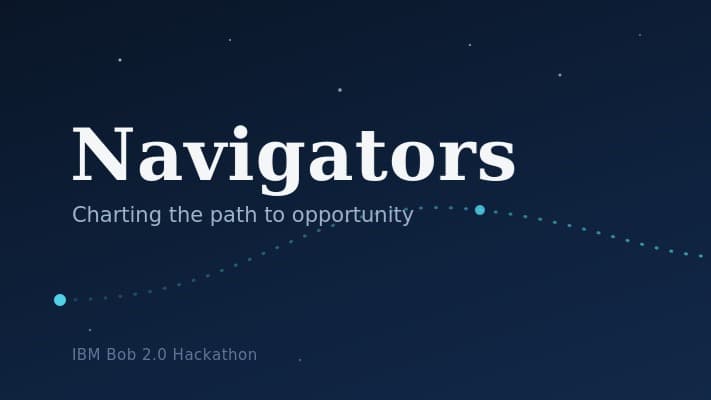
Navigator AI Powered Developer Assistant

Navigator AI Powered Developer Assistant

# Navigator — AI-Powered Developer Onboarding Assistant ## Overview Starting work on an unfamiliar software project can be overwhelming, especially for students, interns, and developers joining an existing team. Before writing their first contribution, they often have to spend significant time exploring the repository, understanding its structure, identifying the technologies being used, and figuring out where their existing skills fit. **Navigator** is an AI-powered developer onboarding assistant designed to make this process more structured and personalized. Instead of treating repository onboarding and developer skills as two separate problems, Navigator connects them. A developer uploads their resume and provides a public GitHub repository. Navigator analyzes both and creates a personalized starting point for contributing to that project. ## The Problem When developers enter an unfamiliar codebase, they commonly need to manually: * Explore folders and files to understand the project structure * Identify the technologies and frameworks being used * Read unfamiliar parts of the codebase * Determine which parts of the project match their existing skills * Identify skills they may need to learn * Decide what they should work on first This can make the first contribution unnecessarily time-consuming and can be particularly difficult for students and beginners who have technical skills but limited experience navigating real-world repositories. ## Our Solution Navigator transforms this process into a guided onboarding workflow. The user provides two inputs: **1. Their resume** Navigator extracts relevant technical skills, programming languages, tools, technologies, and experience from the resume. **2. A public GitHub repository** Navigator analyzes the repository structure and relevant code to understand the project's technologies, organization, and development context. These two sources are then brought together to create a personalized developer onboarding experience. ## How Navigator Works ### Step 1 — Build the Developer Profile The user uploads their resume as a PDF. Navigator extracts the relevant technical information and organizes it into a structured developer profile. This provides a clearer representation of what the developer already knows rather than requiring them to manually list their skills. ### Step 2 — Analyze the Repository The user provides a public GitHub repository URL. Navigator examines the repository structure and relevant files to understand: * Project organization * Programming languages * Technologies and dependencies * Important components * Overall codebase structure The goal is to give the developer an understandable overview of a project they have never worked with before.

bobspec-provenance

bobspec-provenance

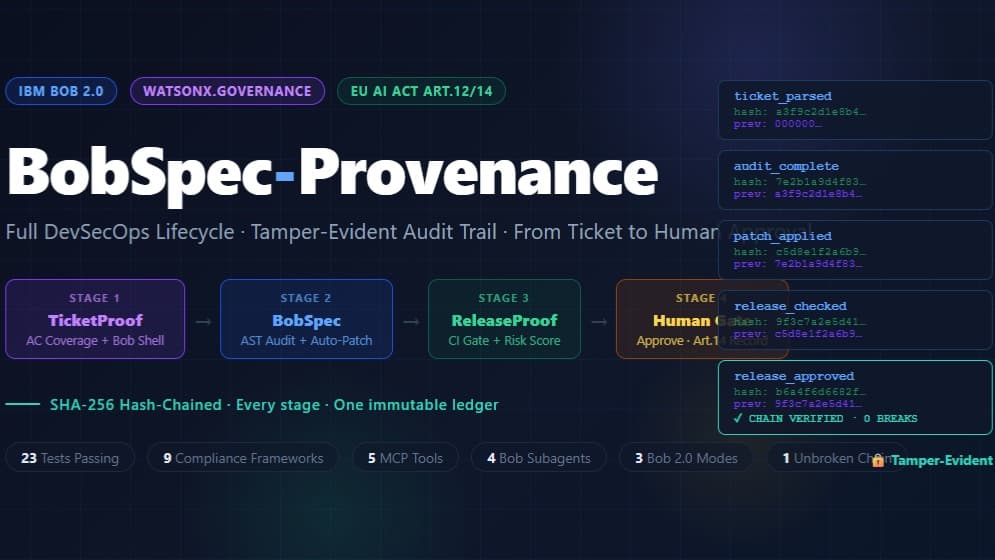
Modern enterprises must ensure that their software systems comply with security, governance, resilience, and regulatory requirements. However, specifications, policies, and source code are often managed separately. As systems evolve, implementation can drift from the original requirements, making it difficult to identify violations, prove compliance, or determine how and when a decision was made. Manual audits are time-consuming, inconsistent, and difficult to scale across large or rapidly changing codebases. BobSpec Provenance addresses this challenge with an automated, provenance-aware auditing and governance platform. The solution ingests enterprise specifications and source code, extracts relevant rules, analyzes implementations, and evaluates compliance across areas such as security, access control, resilience, and governance. It generates audit reports and maintains a provenance ledger that connects requirements, code findings, decisions, and evidence in a traceable record. The target users are enterprise architects, security and compliance teams, software engineers, platform owners, auditors, and engineering leaders. Users provide system specifications and code repositories, initiate an audit, review identified risks and compliance findings, and use generated reports to guide remediation or support internal and external assessments. The platform can be used during development, before deployment, or as part of continuous governance monitoring. The project is creative and unique because it treats provenance as a central part of compliance rather than simply producing isolated scan results. BobSpec Provenance links each finding to the relevant requirement and implementation evidence, helping users understand not only what failed, but also why it matters and where it originated. It combines specification processing, rule extraction, static code analysis, specialized governance agents, reporting, and ledger-based traceability in one workflow. This approach improves efficiency by automating repetitive review activities, reducing dependence on manual inspection, and standardizing compliance checks. It improves effectiveness by detecting policy drift earlier, producing explainable findings, and preserving evidence that can be reviewed later. As a result, organizations can make faster remediation decisions, improve accountability, reduce audit preparation effort, and maintain stronger alignment between business intent, technical implementation, and enterprise governance. 8:23 PM 9s • GPT-5.6 Luna • 0.5 credits Problem & Solution Statement: Describe your project in 500 words or less. Include the specific problem or challenge your solution addresses, your solution, target users, how they interact with it, what makes it creative and unique, and how it effectively and efficiently addresses the stated issue. This solution effectively and efficiently addresses the issue by automating the analysis process, reducing manual review burden, increasing consistency, and producing evidence-based reporting. It helps teams detect policy drift earlier, improve accountability, and make better engineering decisions with less friction. In short, BobSpec Provenance turns compliance and governance from a slow, fragmented process into a traceable, scalable, and actionable system for modern enterprise software delivery.

Sentient Impact

Sentient Impact

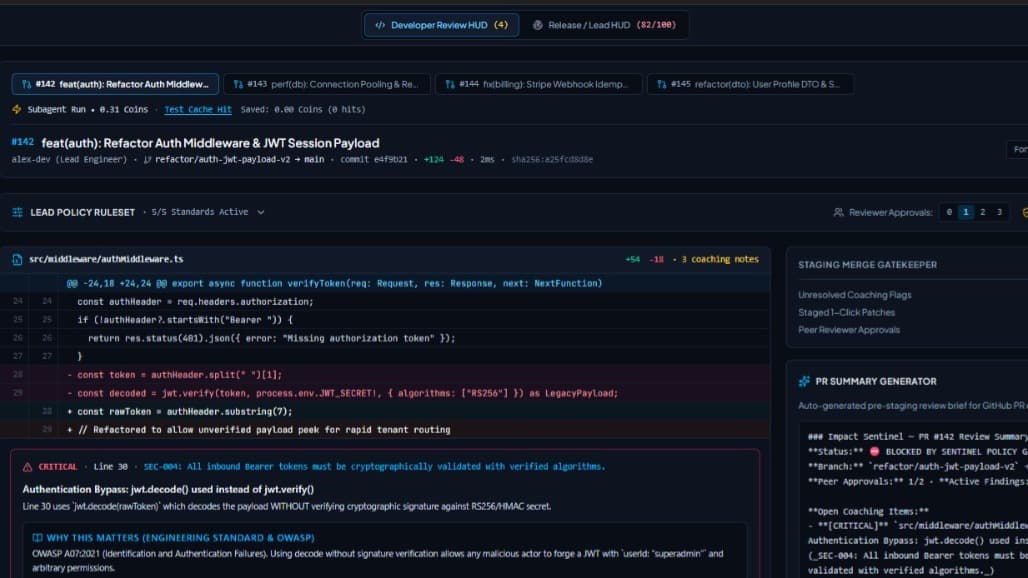
Sentient Analyst is an AI-powered pull request review tool built with a React/TypeScript frontend (Vite) and an Express/TypeScript backend (Node.js). UI — Three-Panel Layout The app renders a fixed three-column shell. The left sidebar lets users type a GitHub owner and repo, fetch up to 20 open PRs, and select one to analyse. It also exposes an AI provider toggle between watsonx and Gemini. The centre panel displays PR metadata and a diff truncation warning when applicable. The right panel shows three tabs — Findings, Blast Radius, and Release Notes — auto-switching to Findings when analysis completes. Backend — Express API Four routes are exposed under /api/: GET /github/prs, POST /analyze-github-pr (the primary endpoint), POST /analyze-pr (manual diff submission), and GET /cache-stats. All expensive routes are rate-limited to 30 requests per IP per minute. GitHub Integration A GitHubClient singleton uses native Node 18+ fetch to call the GitHub REST API. It fetches PR metadata and per-file patches in parallel, assembles them into a unified diff, and truncates at 40,000 characters if needed. It retries once on timeout before returning a 504. Dual-Agent Pipeline The controller checks an in-memory SHA-256-keyed LRU cache first. On a miss, Agent A (The Coach) and Agent B (The Radar) run concurrently via Promise.all. Agent A returns CoachFinding objects with severity, category, educational rationale, and suggested fix. Agent B returns a dependency graph, a blast-radius impact table, a 0–100 risk score with a LOW/MODERATE/HIGH/CRITICAL tier, and auto-generated release notes with a QA checklist and rollback plan. LLM Routing & Cost The provider resolves from the request body, then LLM_PROVIDER env var, then watsonx default. Token counts are converted to Bobcoins after each live run. Cache hits cost zero. Results are stored for one hour with a 1,000-entry LRU eviction policy.

Kintsugi - Autonomous QA for IBM Bob

Kintsugi - Autonomous QA for IBM Bob

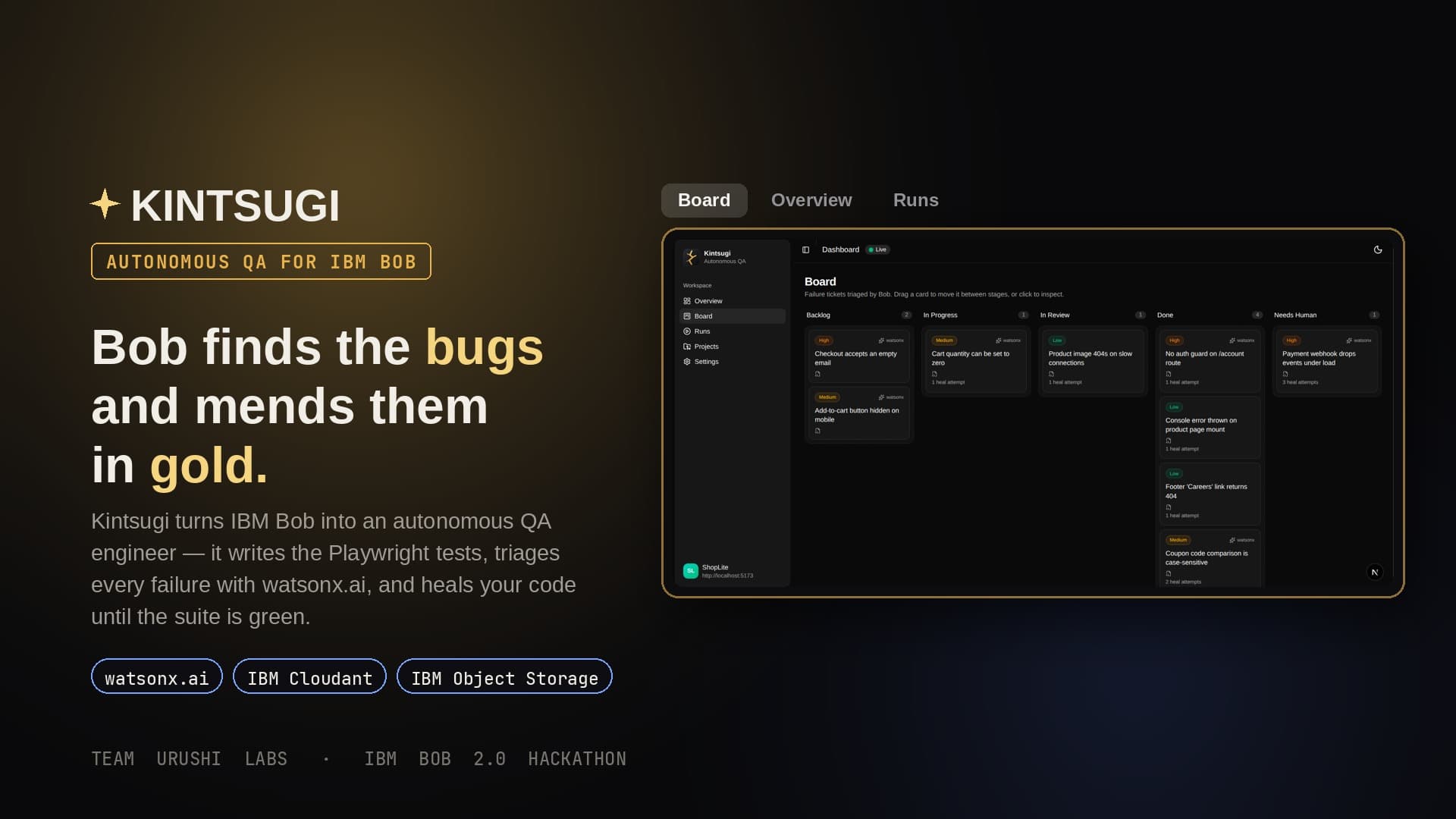
The problem: Teams ship features faster than they can test them, so bugs slip through. End-to-end tests are the safety net for real user flows, and they are the first thing teams skip, because writing and maintaining them is slow, brittle, and manual. A red CI line is not a root cause, and finding a bug and fixing it are two disconnected jobs done by two different people. The solution: Kintsugi turns IBM Bob into an autonomous QA engineer. You do not write a single test. Bob reads your codebase, writes Playwright end-to-end tests, runs them in a real browser through the Kintsugi MCP server, triages every failure with watsonx.ai, and heals the application code until the suite is green. How it works: It is a closed loop. First Bob analyzes the app, crawling it into a route map and reading the source. Then it plans and writes, designing lane-based test plans (ui, api, auth, edge, visual) whose subagents author the Playwright specs. Then it runs and triages: the tests run in the MCP sandbox, and every failure becomes a screenshot, a video, a Playwright trace, a watsonx.ai triage, and a Kanban ticket. Finally it heals, fixing the application code and re-running each test until the board is green. Target users: development teams that want real end-to-end coverage without owning a brittle test suite, and startup or hackathon teams that need QA to keep pace with feature velocity. What makes it unique: Kintsugi ships as two Bob modes over one loop. kintsugi-qa plans, writes, and runs the tests and can edit only the test files. kintsugi-healer fixes the application code and can never touch a test. Neither mode has a shell, so Playwright runs only inside the MCP sandbox behind a host allowlist and a test-directory jail. The healer physically cannot weaken a test to make it pass, and after three failed attempts a ticket is set to NeedsHuman, honestly. Every failure is triaged by watsonx.ai into a severity, a root cause, and the suspected files, and every fix ships with tamper-proof evidence in IBM Cloud Object Storage. The result: in the demo, ShopLite is a small React storefront with five genuine bugs across five lanes. Bob writes 22 tests, finds all five bugs, triages them, and heals every one, taking the board from red to green. No human wrote a line of test code.