
🤝 Top Collaborators

🤓 Latest Submissions
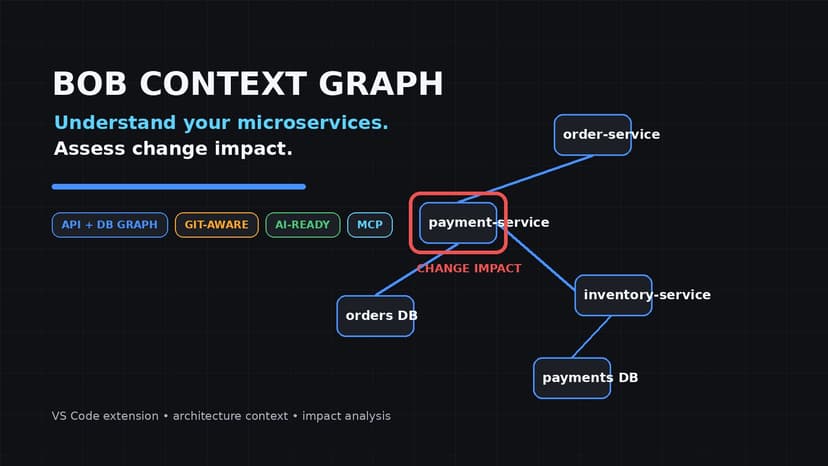
Bob Context Graph
Modern applications often consist of many microservices, APIs, databases, and dependencies. When developers modify one service, understanding which other components may be affected can require manually searching source code, configuration files, database definitions, and Git history. This makes impact assessment time-consuming and increases the risk of missing dependencies before deployment. Bob Context Graph addresses this challenge by providing an interactive system graph directly inside VS Code. It statically analyzes supported application source code and configuration to discover services, APIs, database schemas, and service dependencies, then builds a persistent, workspace-scoped context that can be reused across sessions. Developers can explore their architecture through a visual graph and select service or database nodes to inspect endpoints, tables, and columns. When making changes, they can run Change Impact Analysis against the Git baseline. The system identifies changed components, related dependencies, and severity-labeled findings, helping developers focus their review on areas that may require attention before shipping. The solution is designed for software developers, architects, and engineering teams working with microservice-based systems. Users interact with it through a VS Code sidebar, system graph, and impact-analysis views. The same structured context can also be accessed by external AI tools through an MCP server. A key creative aspect is combining deterministic static analysis, persistent context, Git-aware change detection, and optional AI reasoning in a single developer workflow. Users can choose deterministic analysis, an offline IBM Granite model, or IBM watsonx.ai for reasoning. The architecture also avoids requiring running services or databases for the included demonstration because the context is derived directly from source code. The solution improves efficiency by reusing unchanged parsed context, maintaining a versioned cache, and focusing analysis on the difference between the current working tree and the Git baseline. This allows developers to move from "What changed?" to "What might this change affect?" without leaving their editor.
27 Sep 2026
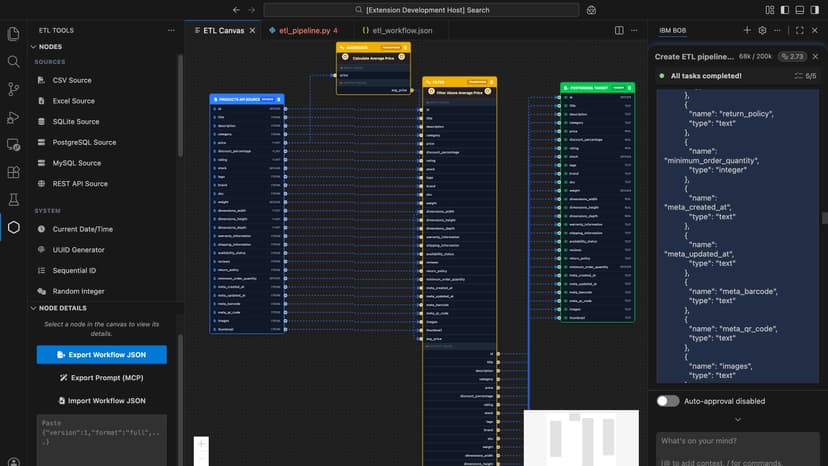
ETL Code
ETL Code is a Visual Studio Code extension that provides an intuitive, node-based interface for building Extract, Transform, Load (ETL) pipelines. Built with React Flow and TypeScript, it enables developers and data engineers to design complex data transformation workflows through drag-and-drop interactions while maintaining code-level flexibility. Key Features Visual Pipeline Designer: Create ETL workflows by connecting source nodes (CSV, databases), transformation nodes (filters, maps, aggregations), and target nodes (SQLite, PostgreSQL/Supabase) in an interactive canvas. Each node is fully configurable with real-time validation and field mapping support. AI-Powered Mapping: Integrated AI service intelligently suggests field mappings between source and target schemas, reducing manual configuration time. The system analyzes data types, naming patterns, and semantic relationships to provide high-confidence mapping recommendations. Robust Execution Engine: Complete backend infrastructure with comprehensive logging, error handling, and automatic database fallback mechanisms. Supports multiple database connectors with connection pooling and transaction management. MCP Integration: Implements Model Context Protocol (MCP), exposing ETL capabilities as tools for AI assistants like IBM Bob and Cline. Users can describe data transformation needs in natural language and receive fully-configured, executable pipelines. The MCP server runs on HTTP/SSE transport (port 3001) for universal accessibility. Advanced Compiler: Semantic compiler pipeline with field propagation rules, type system validation, expression parsing, and workflow serialization. Ensures data integrity and type safety throughout the transformation process. Developer Experience: Clean architecture with React-based webviews, Node.js execution engine, event-driven communication, hot-reload support, comprehensive test suites, and detailed documentation for users and contributors.
17 May 2026


