Qualcomm

Qualcomm was founded in July 1985 in San Diego by seven engineers, including Irwin Jacobs and Andrew Viterbi, as a wireless communications research firm. Over four decades it has become the defining company in mobile silicon, designing the Snapdragon family of system-on-chips that sit inside the majority of the world's Android smartphones, Copilot+ PCs, XR headsets, and connected automotive systems. Qualcomm operates as a fabless semiconductor company, focusing on chip design and its vast patent portfolio covering CDMA, 3G, 4G LTE, and 5G NR technologies.

General
CompanyQualcomm Incorporated
FoundedJuly 1, 1985 by Irwin Jacobs, Andrew Viterbi, and five colleagues
HeadquartersSan Diego, California, USA
Websitequalcomm.com
DocumentationDeveloper Portal
GitHubgithub.com/qualcomm
TypeSemiconductor and Wireless Technology

Core Products

Snapdragon SoC Platform

Snapdragon is Qualcomm's flagship system-on-chip brand integrating CPU, GPU, NPU (Hexagon), modem, and connectivity in a single package. Snapdragon chips power mobile phones, Windows laptops (Copilot+ PC), AR/VR headsets, automotive cockpits, and IoT devices.

Dragonwing

Qualcomm's commercial and industrial product line, built on Snapdragon silicon, targeting industrial IoT, robotics, and smart edge deployments.

Qualcomm AI Hub

A developer platform at aihub.qualcomm.com offering 175+ pre-optimized AI models, a cloud-based profiling workbench for testing across 50+ device types, and sample applications. Developers can optimize, benchmark, and deploy models on Snapdragon hardware without owning devices.

Connectivity and RF

Qualcomm designs Wi-Fi, Bluetooth, and 5G modem products used across consumer electronics, automotive, and infrastructure.


Developer Resources

Qualcomm provides a full developer toolkit for building AI-accelerated applications on Snapdragon hardware, from low-level NPU SDKs to cloud-hosted device profiling.


Key Features

Heterogeneous AI Engine Qualcomm's AI Engine combines the Hexagon NPU, Adreno GPU, and Oryon/Kryo CPU into a coordinated compute pipeline. This lets applications shift workloads to the most efficient processor at runtime, achieving high performance at low power.

On-Device AI at Scale Qualcomm AI Engine ships in over 4.3 billion devices. The Hexagon NPU supports FP32, FP16, INT16, and INT8 precision, enabling deployment of large language models and image generation on mobile hardware without cloud dependency.

Broad SDK Ecosystem Developer tools include the AI Engine Direct SDK (QNN), the AI Model Efficiency Toolkit (AIMET) for quantization and pruning, the Snapdragon Neural Processing Engine (SNPE), and an ONNX Runtime execution provider plugin.


Use Cases

On-Device Generative AI Run quantized LLMs (Llama, Mistral, Qwen) and image-generation models locally on Snapdragon phones and laptops. AI Hub provides ready-to-deploy .pte and optimized model artifacts for direct integration.

Mobile and Embedded Vision Object detection, depth estimation, scene segmentation, and OCR run at real-time framerates on the Hexagon NPU with Qualcomm's pre-optimized model zoo.

Qualcomm AI Technologies top builders

Explore the top contributors showcasing the highest number of Qualcomm AI Technologies app submissions within our community.

Qualcomm AI Technologies Hackathon projects

Discover innovative solutions crafted with Qualcomm AI Technologies, developed by our community members during our engaging hackathons.

Code2Edge: Deployment with Proof

Code2Edge: Deployment with Proof

Porting a PyTorch model to a microcontroller sounds like a model problem, but it's really a pipeline problem. A keyword-spotting model needs audio resampled, windowed, FFT'd, run through a Mel filterbank, log-compressed, and normalized before it ever reaches the network — and the constants controlling each step (window size, FFT convention, epsilon values) are usually scattered across config files nobody rereads. Get one of them wrong in the C rewrite and the device still boots fine; it just quietly predicts the wrong thing, with no black-box "pass/fail" test telling you why. Code2Edge solves this with stage-wise differential parity instead of black-box testing. The same audio corpus runs through both the Python reference pipeline and the generated C pipeline, and every intermediate tensor is compared — max/mean absolute error, cosine similarity, and eventually prediction agreement. If a stage drifts past tolerance, the system flags exactly which stage and offers a deterministic hint (e.g., "shape mismatch at framing — check hop length"), so debugging starts from evidence instead of guesswork. Bob drives this as an orchestrator, not a black-box code generator. An MCP server gives it five hardware-aware tools (profiling the model, inspecting the pipeline, checking the target, running parity tests, benchmarking) plus workflow tools for starting runs and gating steps. Bob follows a fixed sequence: analyze the repo, produce an Edge Readiness Report, pause for a human APPROVE/REJECT, generate code, run a host parity gate (with a 3-attempt repair loop before escalating to a human), build for the MCU, run a device parity gate, benchmark on real silicon, and open a pull request. The target users are embedded/ML engineers who need confidence that a ported pipeline behaves identically to its source model — not just that it compiles. The project is grounded in a real trained workload: a 119,372-parameter DS-CNN for 12-class keyword spotting (96.65% test accuracy), deployed to an STM32U585 (Cortex-M33) on an Arduino UNO Q. What makes this different is the discipline around honesty: every reported number is explicitly labeled real (measured from an artifact) or mock (a placeholder for an unavailable dependency), and the two are never mixed. Host-side parity is fully real and passing across 500 samples and 4 pipeline stages. Physical benchmarking is real and passing on actual silicon (50/50 correct inferences). Device-side parity is real but currently limited to a single fixture rather than the full corpus — an openly disclosed gap, with a hardware-validation guide checked in to finish the job.

Team Xcel- VisionKnob

Team Xcel- VisionKnob

VisionKnob is an interactive AI-powered image understanding system that combines physical hardware controls with computer vision and multimodal AI. The idea behind the project is to make image analysis more intuitive, private, and engaging by allowing users to interact with AI through a physical knob instead of relying only on a keyboard or mouse. The system uses an Arduino UNO Q and Modulino hardware as the physical interface. Users can turn or press the knob to navigate through images, select an image, and interact with the AI assistant. A Streamlit-based interface displays the selected image and allows the user to ask questions about what the image contains. VisionKnob uses a Gemma vision model to analyze the selected image and generate natural-language responses. For example, a user can ask the system to describe an image, identify important objects, explain what is happening in a scene, or answer specific questions about visual details. One of the main goals of VisionKnob is to explore how physical computing and generative AI can work together to create more natural human-computer interactions. Instead of AI existing only as a chatbot, VisionKnob connects AI with real-world hardware controls, making the interaction more tangible and accessible. The project also focuses on local and privacy-conscious AI processing. By using models that can run locally, sensitive images do not necessarily need to be uploaded to external cloud services. This makes VisionKnob useful for applications where privacy, offline access, or low-latency responses are important. VisionKnob demonstrates how multimodal AI, embedded hardware, and modern user interfaces can be combined into a practical system for visual exploration, education, accessibility, research, and future smart-device applications.

MapLLM

MapLLM

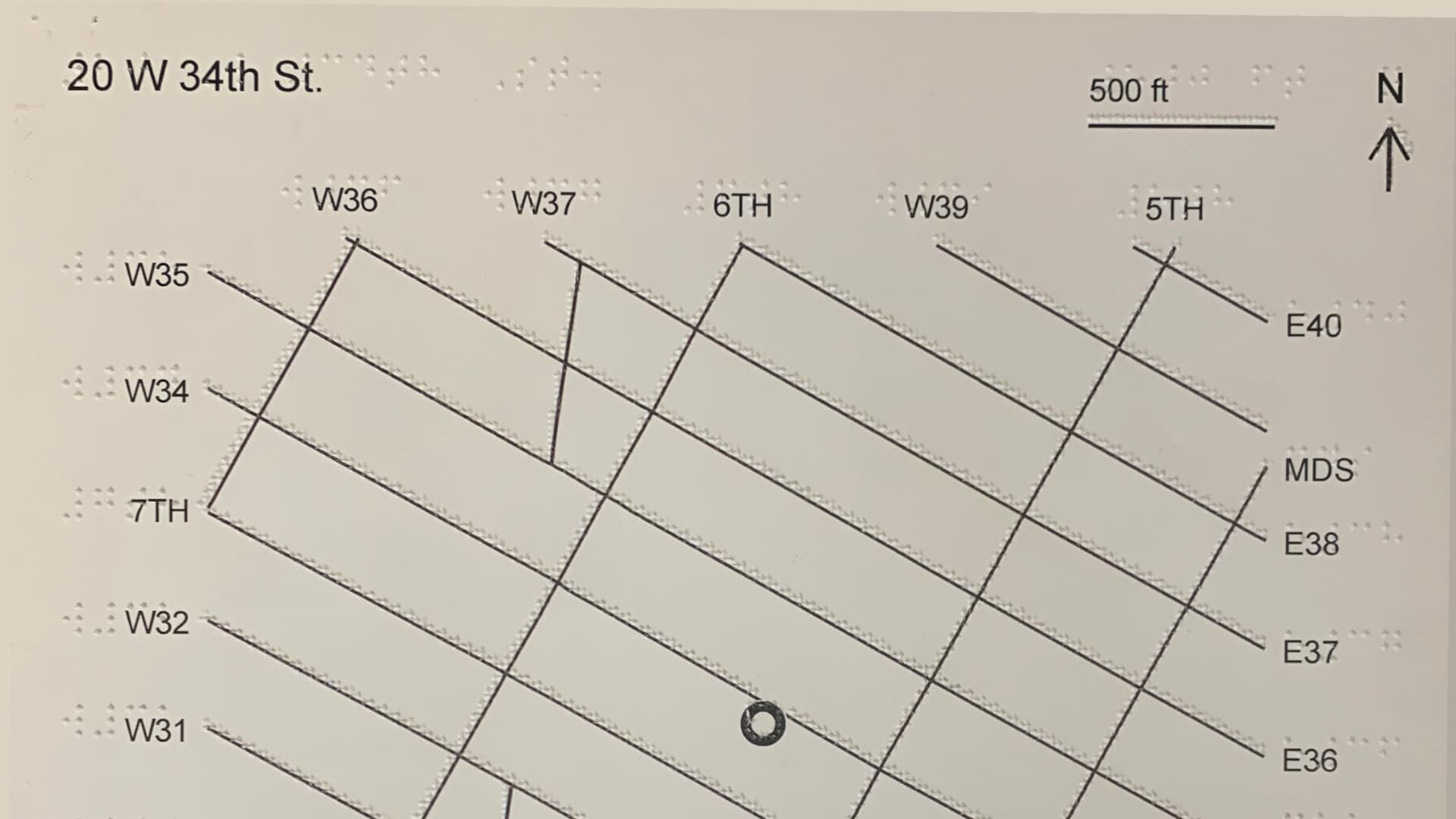
Digital maps are great for navigation but nearly useless for exploration if you're blind: a screen reader gives you a list, never a layout. Tactile maps give real spatial layout under your fingers, but a sheet only fits a dozen braille labels — no store names, distances, hours, or "what is this?" MapIO keeps the cheap embossed sheet and moves all the information into audio. A camera looks down at the map; SIFT homography locks the sheet and MediaPipe tracks your index fingertip, which becomes your avatar on a street-and-POI graph. Wherever you touch, you hear what's there. The audio layer is unbounded, so density is limited by curiosity, not emboss space. For open-ended questions ("what's the closest coffee, and how far from here?") MapIO uses Gemma 4 served locally by Qualcomm AI Hub GenieX on the Snapdragon X Elite NPU. The model never guesses distances or routes: it calls tools on the map graph (get_distance, nearby POIs, guide_to_destination) and speaks deterministic answers. Everything runs on-premises; nothing leaves the LAN. The Qualcomm angle is two chips, two roles. The X Elite is the room's brain: one local LLM and speech server shared by every map. The Arduino UNO Q (QRB2210) is a sub-$60 map station that runs the whole perception loop on-device — SIFT, hand tracking, graph lookup, TTS — and streams speech straight to a speaker over Bluetooth. Plug in, it boots, it says "Map detected." A laptop alone works, and that's a supported deployment. But a board per map is what makes a museum floor or classroom practical: N cheap stations, one shared server, touch feedback that never crosses the network. Next: speech-to-text on the UNO Q itself, and unified Q&A that follows a visitor from map to map.