🤝 Top Collaborators
🤓 Latest Submissions

Warmup
Small talk, networking, a first date, being put on the spot: the only way to get better at them is to practice, and practicing with a real person is the part that feels hard. Warmup lets you practice out loud with AI people who react like real ones. Seven scenes form a ladder, from ordering a coffee to asking someone out or speaking on the spot, so you can start low and work up. While you talk, a gauge around their portrait shows how interested they are and why: +8 for following up on what they said, -7 for a one-word answer. They feel it too. As their interest changes, so does their mood, mid-conversation: they open up, or start looking for an exit and eventually leave. Afterwards you get a replay: how their interest moved, how you sounded (response time, filler words, pace, pauses), coach notes with one thing to try next, and the moments that mattered. Pick one and try it again. They say the same line, remembering everything before it, and you see how a different answer lands. Built on AssemblyAI. The Voice Agent API runs each conversation, hearing you with the new Universal-3.6 Pro Realtime, and session.update changes the persona's mood as it happens. The Sessions API provides the two-channel recording, which Universal-3.5 Pro transcribes with multichannel and disfluencies, so every um and every pause is measured from real word timings. LLM Gateway writes the coach notes. It works hands-free on a phone speaker, and your history stays in your browser.
30 Sep 2026
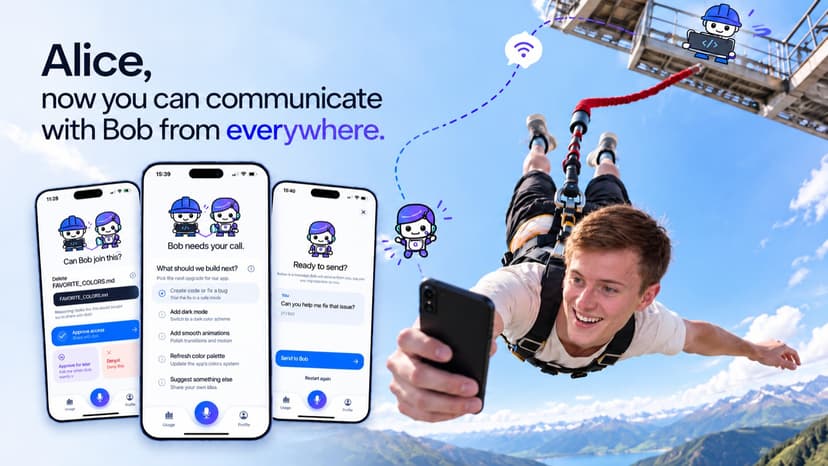
Alice - The Mobile Partner for IBM Bob
AI coding assistants like IBM Bob handle complex tasks, but still need a human for direction and approvals. One open question can stall a session for an hour, so developers stay glued to the IDE instead of stepping away. Our solution Alice brings the decision to the human. It is a native iOS app paired with Bob by scanning a QR code. When Bob needs input, the phone buzzes with a compact card: a short summary and 2 - 4 next steps with one recommended, or a request to run one exact command with a plain-language explanation of each part. Tap once and Bob continues. Or hold the microphone and speak a follow-up. It reaches the same Bob conversation, and Bob answers on the phone. Target users Developers and teams using IBM Bob who want to supervise long-running tasks from their phone, over coffee, in a meeting, or on the way home. How they interact 1. Switch Bob to the Companion agent and start a task. 2. Scan the QR code with Alice. 3. Get notified when Bob needs you. 4. Tap a next step, approve or reject a command, or speak a new instruction. 5. Bob continues immediately. What makes it creative and unique The heart of Alice is the Companion agent, a custom IBM Bob mode that teaches Bob when to involve a human who isn't at the desk. It announces the task, offers next steps after each step (always including "Stop here"), asks before installs, deletes, commits or pushes, never takes a risky action without an answer, and then listens quietly for your voice instead of just stopping. Without these rules Bob simply finished the task; with them, it offers the next steps on its own. Alice also bootstrapped itself: once the first loop worked, we steered Bob from Alice while Bob improved Alice. Approvals are built for trust. The phone shows the exact command, never shortened, so you approve exactly what runs. "Approve for task" is remembered by the server until the task ends, so Bob stops asking for the same command without losing your oversight. Voice gives direction but never approves a command. Alice is a friendly companion, not a remote desktop: a customizable character focused on one decision at a time. How it addresses the problem effectively and efficiently Alice uses only Bob's documented extension points, a custom mode and an MCP server, with no changes to Bob. The MCP server connects outward to a small relay, so nothing on the developer's machine is exposed. Cards are trimmed to phone size, so each decision takes seconds. Notifications (via ntfy) arrive even when the app is closed; speech is transcribed by AssemblyAI with short-lived tokens; pairing secrets stay in the iOS Keychain. Working today: QR pairing, live decision and approval cards, status updates, voice follow-ups and notifications. Usage figures and account sign-in are still simulated. Bob does the development work. Alice keeps you in the loop.
27 Sep 2026
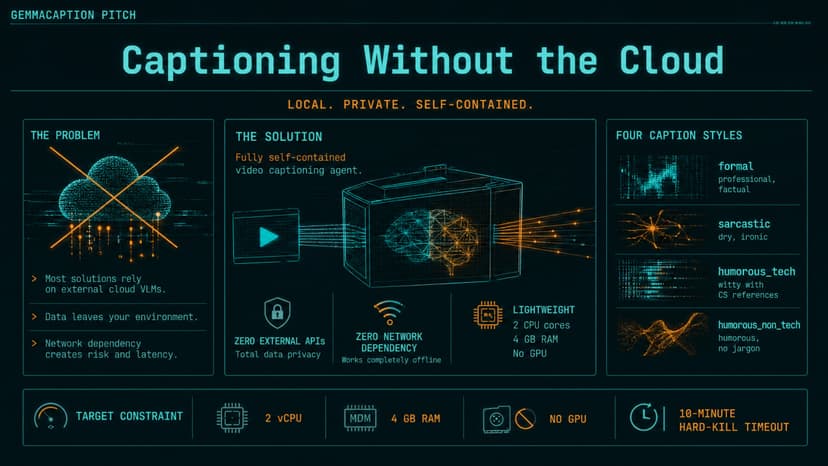
GemmaCaption
GemmaCaption captions video clips in four styles (formal, sarcastic, humorous_tech, humorous_non_tech) with no external model APIs and no credentials: gemma-4-E2B-it (QAT Q4_0 + vision projector) runs entirely inside the container via llama.cpp, on the grading VM's 2 CPU cores in under 4 GB RAM. Gemma writes every word the judge reads. Making a 5B-class multimodal model do this in a 10-minute budget took four tricks. (1) Resolution-aware frame layouts: the vision encoder resizes input to a fixed square, so a 2x2 frame collage arrives at quarter resolution — four frames as two hi-res vertical strips scored 0.841 vs 0.781 on our 16-clip benchmark; the agent measures its own call latency at runtime and picks strips or collage per clip, whatever the budget affords. (2) Tiled frames mean one encoder pass instead of four. (3) The prompt precedes the image, so llama.cpp's prefix cache never re-processes it. (4) Grammar-constrained decoding: each request carries a JSON schema built from that task's styles, guaranteeing exact keys — plus the discovery that Gemma 4, a thinking model, silently pours grammar-constrained output into its reasoning channel unless reasoning is disabled server-side. The whole development loop was Gemma on AMD: gemma-4-26B-A4B-it captioned 636 Wikimedia clips on an AMD Instinct GPU (ROCm) to distill a LoRA fine-tune of E2B, and the same 26B judged every experiment. Its verdict: the grammar-constrained official weights beat our fine-tune 0.887 to 0.855, so the shipped image runs them — we kept the honest result; the full fine-tune pipeline ships in the repo. Reliability: downloads and ffmpeg overlap the serialized Gemma calls; a global budget with cost-aware gates guarantees exit before the kill; results.json is written incrementally and atomically, so a hard kill at any instant still leaves a complete valid file. Validated: 12 clips in 539.5 s of the 600 s budget, 12/12 real captions, ~2.9 GB peak memory.
13 Jul 2026

XIAO Field Copilot
XIAO Field Copilot is a focused multimodal support assistant for Seeed Studio XIAO edge hardware. Instead of building a full wiki-scale RAG system, the project narrows the problem to a practical field workflow: upload a photo of a XIAO board, ask a hardware question, and receive an answer grounded in curated documentation. The copilot supports board identification, troubleshooting, pin and wiring lookup, board comparison, and setup guidance. It uses a XIAO-only corpus covering common boards such as XIAO ESP32S3, ESP32C3, ESP32C6, RP2040, nRF52840, and SAMD21. Each answer includes source-backed citations so users can verify the guidance against official Seeed documentation. The system is intentionally lightweight for a hackathon demo. A Gradio app on Hugging Face Spaces connects to hosted vLLM endpoints: a Qwen3-VL embedding model for multimodal image/text retrieval, an optional multimodal reranker for grounding, and a small Qwen-style agent model for concise support responses. A simple agent router decides whether the user is trying to identify a board, troubleshoot a symptom, compare devices, or find wiring/setup instructions. The AMD angle is that the model endpoints are designed to run on AMD Developer Cloud with ROCm, using AMD Instinct hardware to keep the multimodal retrieval and generation stack available as hosted services. The final product demonstrates how AMD GPUs can power practical edge-device support workflows without requiring the end user to run models locally.
10 May 2026


